
Nearly 46% of all Google searches carry local intent, yet most independent business owners still treat Google Maps as an afterthought. Google Maps SEO is the practice of optimizing your business’s presence so it appears prominently when nearby customers search for what you offer. Done right, it drives real foot traffic, phone calls, and revenue, often faster than traditional website SEO. This guide walks you through exactly how the Maps algorithm works, how to optimize your Google Business Profile, how to build local authority, and how to measure the results so you can make smarter decisions.
Table of Contents
- Understanding Google Maps SEO: What it is and how it works
- How to optimize your Google Business Profile for maximum impact
- Boosting prominence: Reviews, citations, and local authority
- Tracking your Google Maps SEO performance
- Google Maps SEO: Why ongoing management wins over one-time quick fixes
- Level up your local presence with proven SEO solutions
- Frequently asked questions
Key Takeaways
| Point | Details |
|---|---|
| Google Maps drives action | Most local searches on Google lead to real-world visits and purchases within 24 hours. |
| Complete profiles outperform | Fully optimized Google Business Profiles earn significantly more trust, clicks, and customers. |
| Prominence builds authority | Earning quality reviews, citations, and local links boosts your standing and search rankings. |
| Ongoing SEO wins | Continuous optimization and management yield better long-term Maps visibility than set-and-forget fixes. |
Understanding Google Maps SEO: What it is and how it works
Google Maps SEO is the process of improving your business listing so Google ranks it higher inside the Maps results and the local “3-Pack,” the three business listings that appear at the top of a local search results page. When someone searches “plumber near me” or “best coffee shop downtown,” Google pulls from its local index to decide which businesses to show. Your job is to give Google every reason to show yours first.
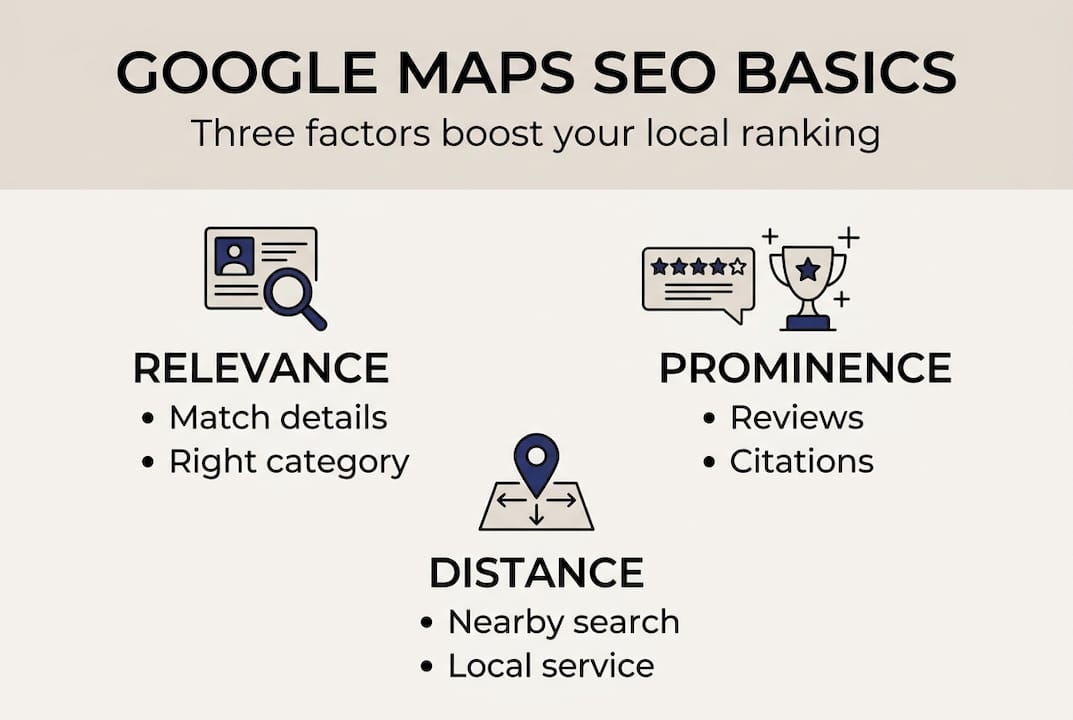
The algorithm behind those results is built on three ranking factors: Relevance, Distance, and Prominence. Understanding each one is the foundation of any effective Maps strategy.
| Ranking factor | What it means | Actionable example |
|---|---|---|
| Relevance | How well your listing matches the search query | Add accurate categories, services, and keywords to your profile |
| Distance | How close your business is to the searcher | Ensure your address is correct; target service areas precisely |
| Prominence | How well-known and trusted your business is online | Earn reviews, build citations, and get local press mentions |
Here is how each factor plays out in practice:
- Relevance: Choose your primary and secondary business categories carefully. Use your business description and services section to include the words real customers type.
- Distance: You cannot move your physical location, but you can define your service area accurately inside your Google Business Profile so Google understands where you operate.
- Prominence: This is the most controllable factor over time. It includes your review count and rating, the number of websites that mention or link to you, and how complete and active your profile is.
“Businesses that rank in the local 3-Pack capture the majority of clicks for high-intent local searches, making Maps visibility one of the most valuable real estate spots in digital marketing.”
If you operate in more than one location or serve multiple service areas, the logic scales. A well-structured multi-location SEO playbook applies these same three factors across each location systematically, so no branch or territory gets left behind.
How to optimize your Google Business Profile for maximum impact
Once you understand what influences Google Maps rankings, the next step is to apply those factors directly to your own profile. Your Google Business Profile (GBP) is the single most important asset in your local SEO strategy. Think of it as your storefront on Google. A neglected profile costs you customers every day.
Complete business profiles are 2.7x more trusted and get up to 70% more visits than incomplete ones. That alone should motivate you to treat your GBP like a living, breathing marketing tool, not a one-time form you filled out years ago.
Here are the essential steps to optimize your profile:
- Claim and verify your listing. If you have not verified your GBP, nothing else matters. Verification unlocks full control of your profile.
- Choose the right primary category. This is the single most influential field in your profile. Pick the category that most precisely describes your core service.
- Add secondary categories. Cover adjacent services you offer without diluting your primary focus.
- Write a keyword-rich business description. Use natural language that includes your main services and city. Avoid keyword stuffing.
- Upload high-quality photos regularly. Businesses with photos receive significantly more direction requests and website clicks. Aim for at least 10 photos to start, then add new ones monthly.
- Keep hours accurate and updated. Holiday hours, temporary closures, and special hours all matter. Inaccurate hours erode trust fast.
- Use the Q&A section proactively. Post and answer your own frequently asked questions. This adds keyword-rich content and helps customers decide quickly.
- Post updates weekly. Google Posts are short updates, offers, or announcements that keep your profile active and signal engagement to the algorithm.
Pro Tip: Reviews are one of the fastest ways to build prominence. After every completed job or sale, ask your customer directly for a Google review. A simple, personal ask outperforms any automated email blast. To further improve GBP engagement, respond to every review, positive or negative, within 48 hours.
| GBP field | Impact on ranking | Priority |
|---|---|---|
| Primary category | Very high | Immediate |
| Business description | High | Immediate |
| Photos | High | Ongoing |
| Reviews and responses | Very high | Ongoing |
| Q&A section | Medium | Monthly |
| Google Posts | Medium | Weekly |
For a broader view of what moves the needle fastest, the top local SEO tips we recommend cover profile optimization alongside the off-profile factors that most owners overlook.
Boosting prominence: Reviews, citations, and local authority
Optimizing your profile is just the start. Real growth comes from strengthening your business’s local authority and reputation, which is what Google calls Prominence. This factor rewards businesses that the broader web recognizes as credible, active, and trusted.

Prominence is shaped by your online reviews, local citations, and the quality of websites that link back to you. It is the most competitive factor because it reflects real-world reputation, and it takes consistent effort to build.
How to earn more quality reviews:
- Ask at the moment of highest satisfaction, right after a great service experience.
- Make it easy by sending a direct link to your Google review page via text or email.
- Train your team to mention reviews naturally at the end of every customer interaction.
- Never offer incentives for reviews. Google prohibits it, and it can get your profile suspended.
How to build local citations:
- Submit your business to major directories: Yelp, Bing Places, Apple Maps, and industry-specific directories.
- Keep your Name, Address, and Phone number (NAP) identical across every listing. Even small inconsistencies confuse Google.
- Audit your existing citations annually to catch outdated information.
How to earn local backlinks and press:
- Sponsor local events or charities and request a link from their websites.
- Contribute expert quotes to local news stories or industry blogs.
- Partner with complementary local businesses for cross-promotional content.
Pro Tip: When you receive a negative review, respond calmly and professionally within 24 hours. Acknowledge the issue, offer a resolution, and keep it brief. Prospective customers read your response more carefully than the review itself. A measured reply actually builds trust.
For a deeper look at how building authority backlinks fits into your overall local strategy, the principles are the same whether you are targeting Maps rankings or organic search positions.
Tracking your Google Maps SEO performance
After investing in optimization, it is essential to know how your efforts pay off and where to improve next. The good news is that Google gives you free performance data directly inside your GBP dashboard, and it is more useful than most business owners realize.
ROI for Google Maps SEO can exceed 300% after three years of consistent effort. But you can only capture that return if you track what is working and adjust what is not.
Here is how to monitor your Maps performance step by step:
- Log into your Google Business Profile dashboard. Navigate to the “Performance” tab to access your Insights data.
- Track search views. This shows how many times your profile appeared in search results. A rising trend confirms your relevance is improving.
- Monitor direction requests. This metric directly correlates with foot traffic intent. If it is flat, your prominence or distance signals may need work.
- Watch phone call clicks. This is one of the most direct indicators of customer intent. Track it weekly and note any spikes tied to profile updates or new reviews.
- Review website clicks. If people are clicking through to your site, your profile is compelling enough to earn the next step. Low click rates may mean your photos or description need updating.
- Use UTM parameters on your GBP website link. Adding a UTM tag (a short tracking code added to a URL) lets you see GBP-driven traffic inside Google Analytics separately from other sources.
- Check keyword queries. GBP shows you what search terms triggered your profile. Use this data to refine your description and services section.
To go further, learn how to track local SEO leads from Maps all the way through to actual conversions, so you can tie your SEO investment directly to revenue.
Google Maps SEO: Why ongoing management wins over one-time quick fixes
Here is something most guides skip over: the businesses that dominate Google Maps in competitive markets are not the ones that set up their profiles perfectly once. They are the ones that treat their profile like an active marketing channel.
The common mistake is finishing the setup checklist and moving on. But Google rewards signals of ongoing activity, fresh reviews, new photos, regular posts, and updated information. A profile that went dark six months ago looks stale to the algorithm, even if it was once well-optimized.
There is also a strategic angle worth noting. Distance is the one factor you cannot control. But prominence and relevance can overcome distance when they are strong enough. A business two miles away with 200 reviews, consistent posts, and strong citations can outrank a competitor one block from the searcher. That is a real competitive advantage you can build deliberately.
The practical takeaway: schedule recurring time each month to add photos, respond to reviews, post an update, and check your Insights data. Pair that with a quarterly citation audit and a steady review-request habit. For more ways to stay ahead, the actionable SEO tips we have published cover both the quick wins and the longer-term moves that compound over time.
Level up your local presence with proven SEO solutions
Everything covered in this guide works. But executing it consistently while running a business is where most owners fall short. That is where expert support makes the difference.
At Battle SEO, our local SEO services are built specifically for independent business owners who want to dominate their local market without getting buried in technical details. From Google Business Profile management and review strategy to citation building and authority link-building, we handle the ongoing work that drives real results. We also share practical GBP engagement tips and top 5 SEO tips to keep you informed every step of the way. Ready to see what consistent, strategic Maps SEO can do for your business? Reach out for a free consultation.
Frequently asked questions
What is the main goal of Google Maps SEO?
The main goal of Google Maps SEO is to increase your business’s visibility in Maps results so more local customers find and choose you over competitors. Higher Maps rankings translate directly into more calls, visits, and revenue from people already searching for what you offer.
How do I get my business to appear higher on Google Maps?
Optimize your Google Business Profile, gather positive reviews consistently, and keep your business information accurate and up to date. Profile completeness and reviews are two of the strongest signals Google uses to determine local rankings.
Does Google Maps SEO really bring more customers?
Yes. 76% of local searches lead to a business visit within 24 hours, and 28% result in a purchase, making Maps one of the highest-converting digital channels available to local businesses.
How long does it take to see results from Google Maps SEO?
Some improvements, like profile completeness and corrected information, can show results within weeks. The biggest gains come from long-term consistent effort over several months as reviews, citations, and authority accumulate.
What’s the difference between Google Maps SEO and organic SEO?
Google Maps SEO targets local intent searches and improves your position in the Maps results, while organic SEO focuses on ranking in the standard web results and typically targets a broader audience beyond just local customers.