

TL;DR:
- User experience signals are now essential ranking factors, helping remove penalties and improve visibility through Core Web Vitals.
- Good UX influences business metrics such as conversions, bounce rates, and user trust, directly impacting revenue potential.
- Monitoring real user data via Chrome User Experience Report ensures accurate insights, guiding effective, ongoing UX optimization strategies.
Most SEO professionals were trained to think in terms of keywords, backlinks, and crawlability. Those elements still matter. But the role of user experience in SEO has grown into something you can no longer treat as optional or secondary. Google now evaluates how your site feels to real users, not just how well it’s structured for bots. Core Web Vitals, interaction responsiveness, and design quality all feed directly into how search engines assess your pages. This guide breaks down exactly how UX signals work, what they mean for your rankings, and how to act on them without losing sight of content and authority.
Table of Contents
- Key Takeaways
- How the role of user experience in SEO works technically
- UX impact on business outcomes beyond rankings
- Practical UX optimization strategies for SEO gains
- Balancing UX with content and overall SEO strategy
- My take on UX and SEO: what I’ve actually seen
- Ready to align your UX and SEO strategy?
- FAQ
Key Takeaways
| Point | Details |
|---|---|
| UX signals act as gatekeepers | Poor Core Web Vitals can suppress rankings; good scores remove penalties rather than boost positions. |
| Real user data drives evaluation | Google measures UX using CrUX field data at the 75th percentile, not lab tool scores like Lighthouse. |
| Speed and design affect revenue | A 1-second load delay can cut conversions by 20%, making UX a direct business performance issue. |
| Content quality remains primary | UX optimization without strong content and backlinks will not move the needle on competitive queries. |
| AI search demands solid UX foundations | Google’s generative AI features rely on the same core ranking signals, so UX and content quality stay critical. |
How the role of user experience in SEO works technically
Search engines don’t just read your HTML anymore. They collect behavioral and performance data from real users and fold that into their ranking systems. Understanding the mechanics behind this is the first step toward making smarter optimization decisions.
Core Web Vitals explained
Google’s primary UX measurement framework centers on three metrics:
- Largest Contentful Paint (LCP): Measures how long it takes for the main visible content on a page to load. A good LCP is 2.5 seconds or faster.
- Cumulative Layout Shift (CLS): Tracks visual instability, meaning how much page elements shift unexpectedly while loading. A good CLS score is 0.1 or less.
- Interaction to Next Paint (INP): Replaced First Input Delay and measures end-to-end responsiveness across all user interactions. Good INP is 200ms or less, making it the most demanding of the three.
| Metric | What it measures | Good threshold |
|---|---|---|
| LCP | Main content load speed | 2.5 seconds or less |
| CLS | Visual layout stability | 0.1 or less |
| INP | Interaction responsiveness | 200ms or less |
How Google actually measures your UX
This is where a lot of SEO professionals get tripped up. Google does not use Lighthouse scores or PageSpeed Insights lab data to determine rankings. Instead, it pulls from the Chrome User Experience Report (CrUX), which collects field data from real Chrome users. Your site’s score is evaluated at the 75th percentile of real user sessions. That means 75% of your users need to have a good experience, not just the average.
Lab tools are useful for diagnosing problems. But CrUX field data is what influences your rankings. If your Lighthouse score looks great but your field data is poor, your rankings reflect the field data.
Google also evaluates mobile and desktop separately, with mobile data carrying more weight for most queries given today’s usage patterns.
Pro Tip: Set up a Google Search Console account and check the Core Web Vitals report under “Experience.” This shows your real field data segmented by mobile and desktop, which is far more useful than running a one-off PageSpeed test.
Core Web Vitals function as a ranking gatekeeper, not a growth lever. Fix failures to remove penalties. Once you pass thresholds, your energy is better spent on content quality and authority.
UX impact on business outcomes beyond rankings
The impact of UX on SEO goes well beyond the ranking signals themselves. User behavior on your site shapes engagement metrics that matter to both search engines and your bottom line.
The numbers are hard to ignore. A 1-second delay in load time can reduce conversions by 20% and user satisfaction by 16%. That’s not a marginal difference. For an e-commerce site doing $500K a month, a single second of unnecessary load time could cost $100K in monthly revenue.

Design quality compounds this effect. Users form first impressions in roughly 50 milliseconds, and 94% of those first impressions are design related. Your visual layout, typography, and spacing influence whether a user stays or bounces within less time than it takes to blink. High bounce rates send a signal back to Google that users aren’t finding what they need, which feeds indirectly into how pages are assessed over time.
There’s also the psychological dimension. Hick’s Law tells us that the more options you present to a user, the longer it takes to make a decision. Cluttered navigation, aggressive pop-ups, and unclear CTAs raise cognitive load and push users toward the back button. Fewer, clearer choices lead to faster decisions and better engagement metrics.
“Every $1 invested in UX returns about $100.” — Smashing Magazine, 2026
The ROI case for UX is clear. UX improvements can yield up to 9,900% ROI by increasing conversions and reducing support costs. Mature UX practices correlate directly with stronger revenue growth over time.
Key business metrics tied to UX quality:
- Bounce rate: Poor load speed and confusing layouts push this higher.
- Session duration: Good UX keeps users exploring additional pages.
- Pages per session: Clear navigation encourages deeper site engagement.
- Conversion rate: Friction in forms and checkout flows directly reduces this.
Pro Tip: Use tools like Microsoft Clarity or Hotjar to watch session recordings and heatmaps. You’ll spot UX friction points in minutes that no analytics report would surface on its own.
Practical UX optimization strategies for SEO gains
Knowing that UX affects rankings is one thing. Knowing where to focus your effort is another. Enhancing SEO through UX requires a prioritized, systematic approach rather than trying to fix everything at once.
Here’s a practical sequence to work through:
-
Audit your field data first. Pull your CrUX data from Search Console or tools like PageSpeed Insights. Identify which URLs are failing Core Web Vitals and which device type is most affected.
-
Address INP issues by profiling long tasks. INP is a composite metric covering input delay, event handler processing, and presentation delay. Deferring or isolating third-party scripts is one of the most effective ways to reduce main thread blocking and improve responsiveness. Chat widgets, ad scripts, and analytics tools are frequent culprits.
-
Reduce layout shifts during page load. Set explicit width and height attributes on images and embeds. Reserve space for ads or dynamically loaded content. CLS problems are often fast fixes once you identify the elements causing the shift.
-
Optimize LCP by prioritizing critical resources. Use "fetchpriority=“high”` on hero images. Preload your LCP image in the HTML head. Eliminate render-blocking CSS and JavaScript above the fold.
-
Audit your mobile UX separately. Run through your most important landing pages on a real mid-range Android device, not just Chrome DevTools emulation. Tap targets, font sizes, and form inputs all behave differently on real hardware.
-
Simplify your navigation and page structure. Reduce the number of menu items visible by default. Group related content logically. A clear hierarchy helps both users and search engine crawlers understand your site’s organization.
-
Monitor field data trends over time. A single good score doesn’t protect you. If you push a JavaScript-heavy update or add a new third-party widget, your INP can degrade quickly. Check CrUX data monthly, not once per quarter.
Pro Tip: When working on SEO user interface design, prioritize above-the-fold performance first. Users and search engines both judge the initial viewport experience most harshly. Get that right before optimizing deeper page content.
Understanding how UX affects search ranking at a technical level lets you communicate these priorities clearly to developers, which is often the hardest part of the process.
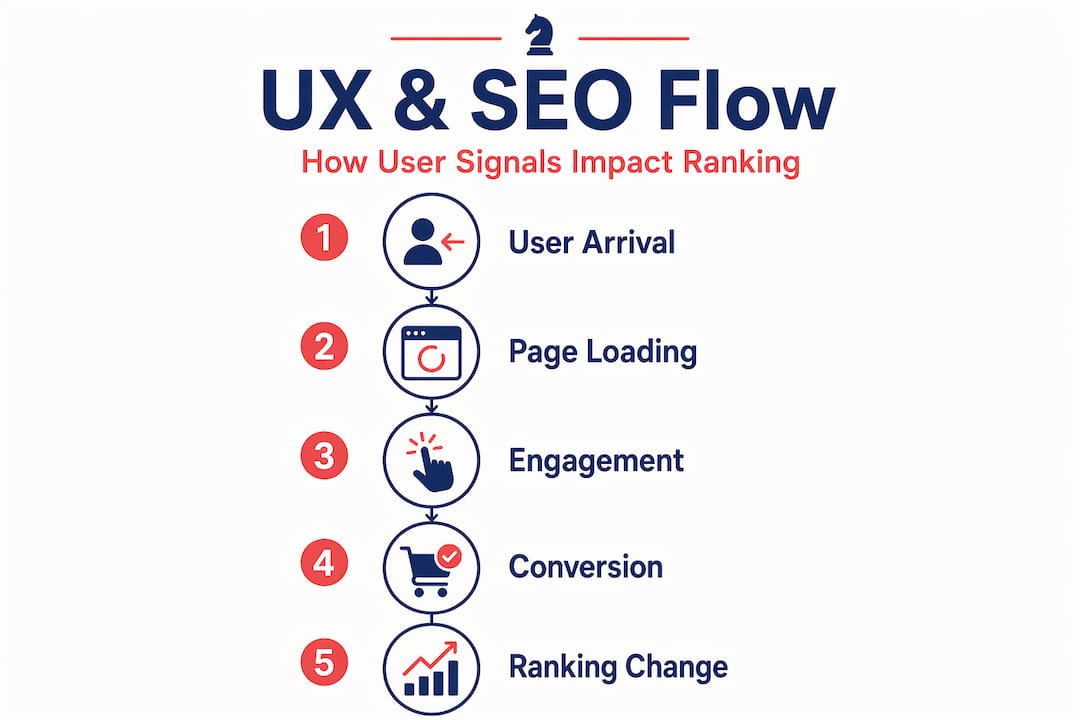
Balancing UX with content and overall SEO strategy
Here’s something worth saying plainly: the importance of user experience in SEO does not mean it replaces everything else. This is a nuance that gets lost when Core Web Vitals become a team’s entire focus.
Content relevance and backlink authority remain Google’s primary ranking factors. A technically perfect site with thin content and no external links will not outrank a slower competitor with strong topical authority on competitive queries. UX optimization helps you compete at the margins and removes technical penalties. It doesn’t substitute for the fundamentals.
A useful way to think about it: content and authority build the ceiling of your ranking potential. UX determines whether you hit it.
Where UX and SEO intersect most productively:
- Intent alignment: Pages that load fast and present information clearly tend to satisfy search intent better. Google’s systems reward pages where users find what they came for without immediately leaving.
- Engagement signals: Time on page, scroll depth, and interaction rates aren’t direct ranking inputs, but they reflect the same behaviors that make a page genuinely useful.
- Internal linking and navigation: Good UX design supports logical internal link structures, which help both users and crawlers move through your site efficiently.
| Factor | Primary role in SEO | UX connection |
|---|---|---|
| Content quality | Core ranking signal | UX keeps users engaged with it |
| Backlinks | Core authority signal | Indirectly, good UX earns organic links |
| Core Web Vitals | Gatekeeper/penalty removal | Direct UX measurement |
| Site structure | Crawlability and topical authority | UX-driven navigation supports both |
The AI search angle matters here too. Google’s generative AI features depend on the same core ranking signals as traditional search, meaning foundational UX and content quality stay relevant as AI-driven results expand. Adapting your approach to AI search platforms means building on a foundation where UX and content work together, not in competition.
My take on UX and SEO: what I’ve actually seen
Working with clients across different markets and categories, I’ve noticed a consistent pattern. Teams get excited about Core Web Vitals audits and spend weeks chasing a perfect Lighthouse score in lab conditions. Then they check their CrUX data and realize it barely moved.
The mistake is treating UX as a project with an end date. It’s not. Every time you add a new plugin, run a new ad campaign, or push a site redesign, your UX signals shift. The teams that win long-term are the ones who make UX monitoring a standing agenda item, not a one-time audit.
I’ve also seen the opposite failure: teams that obsess over content and backlinks while ignoring the fact that their mobile INP is well over 500ms. They’re leaving ranking potential on the table by letting a fixable problem persist.
The practical priority I’d give anyone starting this process: fix failures before chasing perfection. Pass Core Web Vitals thresholds on mobile for your highest-traffic pages first. Then redirect your energy toward content marketing and authority building. That sequencing is where the real ranking gains compound.
What often gets overlooked is the connection between UX and user trust. A site that loads fast, looks credible, and behaves predictably gets more repeat visits. More repeat visits mean more branded searches. More branded searches signal authority to Google. The loop is real, and most SEO roadmaps never account for it.
— Mike
Ready to align your UX and SEO strategy?
If you’ve been treating UX and SEO as separate workstreams, you’re probably leaving both ranking potential and conversions behind.

At Battleseo, we help independent business owners and marketing teams get found in both traditional search and AI platforms like ChatGPT and Perplexity. Our approach integrates local SEO services and UX signal optimization within a single framework, so you’re not patching problems in isolation. If you want to know exactly where your site stands on UX performance and how it’s affecting your visibility, explore our AI search optimization guide or reach out to talk through your specific situation.
FAQ
What is the role of user experience in SEO?
User experience signals, including Core Web Vitals like LCP, CLS, and INP, are confirmed Google ranking factors that act as gatekeepers. Good UX removes ranking penalties, while poor UX can suppress your search visibility.
Do Core Web Vitals directly boost rankings?
Core Web Vitals work as a gatekeeper, not a primary growth lever. Passing the thresholds removes a potential ranking penalty, but content quality and backlinks remain the dominant factors for ranking position.
How does page speed affect SEO and conversions?
Page speed affects both. A 1-second load delay can reduce conversions by 20%, and Google uses real user speed data to evaluate page experience signals across your site.
Should I use Lighthouse scores to track my UX for SEO?
No. Google evaluates UX using CrUX field data from real users, not Lighthouse lab scores. Use Google Search Console’s Core Web Vitals report to monitor what actually influences your rankings.
How does UX connect to AI search optimization?
Google’s AI-driven search features rely on the same core ranking signals as traditional search. Strong UX paired with high-quality content positions your site well for both standard results and AI-generated answers, making UX in holistic SEO strategy increasingly critical in 2026.