

TL;DR:
- Tracking local SEO results involves measuring visibility in local search, Google Business Profile engagement, and business actions generated by searches. It requires combining rank tracking, GBP insights, GA4 analytics, and call tracking to accurately gauge what drives customer interactions and revenue.
Tracking local SEO results means measuring your visibility in local search, your Google Business Profile engagement, and the real business actions those searches produce. Most local business owners check their Google ranking once a month and call it done. That approach misses the full picture. Proper local SEO measurement combines rank tracking, Google Business Profile (GBP) insights, GA4 analytics, and call tracking to give you a complete view of what is working and what is costing you customers. This guide walks you through every layer of that system.
How to track local SEO results: the metrics that actually matter
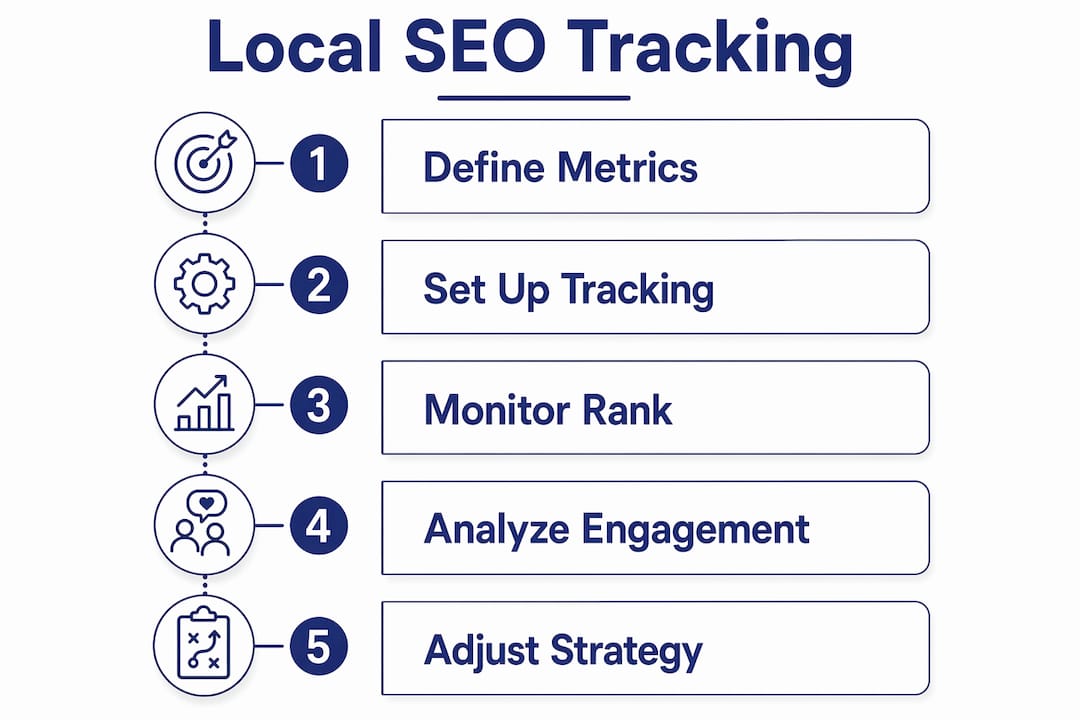
Local SEO performance measurement is the practice of monitoring the specific data points that reflect how well your business appears, engages, and converts in local search. The industry standard term for this practice is local SEO performance monitoring, and it covers far more than a single keyword ranking.
The core metrics you need to watch are:
- Local Pack position: Where your business appears in the Google Maps 3-pack for your target searches. This is the most visible real estate in local search, and a drop from position 2 to position 4 can cut your click volume significantly.
- Geo-grid rankings: Your rank across multiple points in your service area, not just from city center. Geo-grid tracking reveals neighborhood-level rank variations that a single-point check will never show you.
- GBP views, calls, and direction requests: These are the engagement signals inside your Google Business Profile. Direction requests are the strongest foot traffic signal available to you without installing sensors in your store.
- Click-to-call actions: The number of users who tap your phone number directly from search results. This metric connects online visibility to offline revenue in a way that impressions never can.
- Review velocity and sentiment: How fast new reviews arrive and whether the tone is trending positive or negative. Review velocity and sentiment enhance the accuracy of local SEO measurement beyond raw rank data.
Average position and total impressions alone are insufficient measures. A business can rank in position 1 for a low-intent query and generate zero calls. Focus on the metrics that reflect customer decisions, not search engine math.
Pro Tip: Set up a simple tracking spreadsheet that logs your Local Pack position, GBP call volume, and direction requests on the same day each week. Consistency in timing removes day-of-week variance from your data.

How to set up UTM tracking and GA4 for local search attribution
Accurate attribution is where most local business owners lose the thread. Your GBP listing has multiple clickable links: the website button, the appointment link, the menu link, and product links. Without tagging each one separately, GA4 treats all of that traffic as a single undifferentiated source.
Follow these steps to build a clean attribution system:
- Create unique UTM parameters for each GBP link. Use a consistent naming convention such as "utm_source=google&utm_medium=gbp&utm_campaign=local&utm_content=website-button`. UTM campaigns can separate traffic from appointment, menu, or product clicks to make GA4 journeys fully auditable.
- Apply the tags to every destination link in your GBP. Log into your Google Business Profile, go to each link field, and paste the tagged URL. Do not skip the appointment or menu links. Those are often the highest-intent clicks you receive.
- Validate in GA4 Realtime. After tagging, click each link yourself from a mobile device and confirm the session appears in GA4 Realtime with the correct source and campaign. Standardized UTM validation in GA4 Realtime prevents attribution errors before they compound over weeks of data.
- Filter GA4 reports by campaign. Build an Exploration report in GA4 filtered to your GBP campaign. This shows you which GBP link types drive the most engaged sessions, which pages users land on, and where they drop off.
- Add call tracking with Dynamic Number Insertion. Services like CallRail swap your displayed phone number based on the traffic source, so calls from your GBP listing are logged separately from calls from your website or paid ads. Dynamic Number Insertion and click-to-call metrics give you the conversion attribution that GA4 alone cannot capture.
One honest caveat: GBP data and GA4 data will never match perfectly. Google Search Console, GBP Insights, and GA4 each count sessions and interactions differently. Attribution splits among these platforms appear imperfect by design, but they are manageable when you standardize your naming conventions and define which platform owns which metric.
Pro Tip: Never use auto-tagging and manual UTM parameters on the same link. They conflict. Choose one system per traffic source and document your decision so future reporting stays consistent.
What tools work best for local rank tracking?
Choosing the right local SEO result tracking tools depends on how granular you need your data and how many locations you manage. Here is a comparison of the main approaches:
| Tracking method | What it shows | Best for |
|---|---|---|
| Single-point rank check | Your rank from one location, usually city center | Quick snapshots, not strategic decisions |
| Geo-grid rank tracking | Rank across 9 to 16 points in your service area | Service area businesses, multi-neighborhood visibility |
| GBP Insights dashboard | Views, calls, direction requests, photo views | Engagement and conversion signals |
| GA4 with UTM filtering | User behavior after the click, session quality | Attribution and on-site conversion analysis |
| Automated rank alerts | Instant notification of ranking drops or gains | Ongoing monitoring without manual checks |
For most local businesses, geo-grid tracking is the single most revealing tool available. Tracking from 9 to 16 strategic points across a 3×3 or 4×4 grid captures micro-local SEO performance variations that city-center checks miss entirely. A plumber in Dallas might rank in position 1 near their shop but fall to position 8 three miles north. That gap represents lost revenue, and you cannot fix what you cannot see.
Service area businesses benefit most from this approach. Rank differences by ZIP code directly influence competitive strategy, especially when you are deciding where to build citations, earn backlinks, or focus content efforts.
Beyond geo-grids, set up automated weekly rank reports and instant alerts for significant ranking drops. Monitoring early micro-signals can predict ranking changes 7 to 14 days in advance, giving you time to respond before a competitor captures your position. Tools like BrightLocal, Whitespark, and Local Falcon each offer geo-grid tracking with scheduled reporting built in.
For competitor tracking, most geo-grid tools let you overlay competitor positions on the same grid. This shows you exactly where a rival outranks you and by how much, which turns a vague competitive concern into a specific geographic target.
Why rankings alone don’t tell you if local SEO is working
This is the mindset shift that separates businesses that grow from those that spin their wheels. A ranking is an input. Revenue is the output. The two do not always move together, especially in 2026’s AI-influenced search environment.
“Business leaders want SEO reports focused on real pipeline and revenue metrics, not just rankings, especially since AI reduces reliance on clicks.” — Involve Digital, SEO Performance Measurement Guide 2026
Rankings alone do not reliably predict business outcomes in AI-heavy SERPs. When Google’s AI Overview answers a user’s question directly on the results page, that user may never click through to any website. Your ranking stays the same. Your traffic drops. Measuring only rank misses this entirely.
The metrics that reflect actual business impact are organic-sourced revenue, cost per organic lead, call volume from GBP, and direction requests. These connect your SEO work to customer decisions. When you track calls and leads from local SEO alongside rank data, you build a report that tells a complete story.
Combine visibility data with engagement signals for the clearest picture. A business with a position 3 ranking, 200 monthly GBP calls, and a 4.8-star review average is performing better than a business at position 1 with 40 calls and a 3.9-star average. Local SEO tracking must integrate engagement and trust signals with traditional ranking metrics to reflect real performance. When you present reports to yourself or a partner, lead with calls, direction requests, and revenue. Rankings belong in the supporting data, not the headline.
Common pitfalls that break your local SEO tracking
Even well-intentioned tracking setups produce bad data when these mistakes go uncorrected:
- Relying on one metric. Average position or total impressions alone will mislead you. A spike in impressions from a low-intent query looks like progress but produces no customers.
- Missing or inconsistent UTM tags. One untagged GBP link sends traffic to GA4 as direct or organic, making your attribution report unreliable. Audit every GBP link quarterly.
- Tracking only city-center rank. If your service area spans multiple neighborhoods or ZIP codes, a single-point rank check gives you one data point from a territory that may contain dozens of competitive micro-markets.
- Ignoring review velocity. A sudden slowdown in new reviews, or a cluster of negative reviews, is an early warning signal for ranking drops. Most businesses notice the ranking drop weeks after the review trend started.
- Never validating your setup. UTM parameters break when URLs are updated, GBP links are edited, or website redirects change. Schedule a monthly check where you click each tracked link and confirm the session appears correctly in GA4 Realtime.
The why behind tracking SEO results is simple: you cannot make confident decisions without reliable data. Bad tracking is often worse than no tracking, because it creates false confidence.
Key takeaways
Effective local SEO measurement requires combining geo-grid rank tracking, GBP engagement metrics, proper UTM attribution in GA4, and business-impact KPIs to produce data you can act on.
| Point | Details |
|---|---|
| Use geo-grid rank tracking | Track 9 to 16 points across your service area to find neighborhood-level ranking gaps. |
| Tag every GBP link with UTMs | Separate appointment, menu, and website clicks in GA4 to make attribution auditable. |
| Prioritize business-impact KPIs | Measure calls, direction requests, and organic revenue rather than average position alone. |
| Monitor review velocity | Track how fast and how positively reviews arrive as an early signal of ranking changes. |
| Automate alerts and reports | Set weekly rank reports and instant drop alerts to catch changes before competitors capitalize. |
What I’ve learned from tracking local SEO across hundreds of markets
I have worked with local businesses from single-location shops in small Connecticut towns to multi-location service companies covering entire metro areas in Texas. The pattern I see repeatedly is this: business owners who fixate on ranking position feel like they are always chasing something. Business owners who track calls, direction requests, and review trends feel like they are managing something.
Geo-grid tracking changed how I advise clients more than any other tool shift in the past five years. Before geo-grids, a client would rank position 1 and wonder why their phone was not ringing. After layering in a geo-grid, we would discover they ranked position 1 at their address and position 9 in the ZIP code where 60% of their customers actually lived. That is a fixable problem, but only once you can see it.
My honest recommendation: start with a 3×3 geo-grid centered on your primary service area, set up UTM-tagged GBP links this week, and define three business-impact KPIs before you look at rankings again. The local SEO process for visibility works best when measurement is built into the strategy from day one, not bolted on after the fact. Review your tracking data on a fixed schedule, adjust your strategy when the data shifts, and resist the urge to change tactics based on a single week of movement.
— Mike
Ready to get serious about your local SEO performance?
Knowing how to measure local SEO is one thing. Having a system that does it consistently and ties results back to real revenue is another. At Battleseo, we build tracking frameworks for local business owners that cover geo-grid rank monitoring, GBP optimization, UTM attribution, and call tracking from day one.
If you are ready to stop guessing and start measuring what actually drives customers through your door, explore our local SEO services or read our guide on unlocking local SEO visibility to see exactly how we approach local search for independent business owners across the U.S. We take on only one business per category per market, so your competitive advantage stays protected.
FAQ
What is the best way to track local SEO results?
The most effective approach combines geo-grid rank tracking, Google Business Profile Insights, UTM-tagged links in GA4, and call tracking via Dynamic Number Insertion. Together, these tools give you visibility, engagement, and conversion data in one reporting system.
How often should I check my local SEO performance?
Review GBP engagement metrics weekly and run a full geo-grid rank report monthly. Set automated alerts for significant ranking drops so you can respond within days rather than weeks.
Why do my GBP and GA4 numbers never match?
Google Business Profile Insights, Google Search Console, and GA4 each count interactions differently by design. Attribution splits across platforms are expected, but standardizing your UTM naming conventions and defining which platform owns which metric keeps your reporting consistent and usable.
Do rankings still matter for local SEO in 2026?
Rankings matter, but they are not the headline metric. Organic-sourced revenue and cost per organic lead reflect business outcomes more accurately than average position, especially as AI Overviews reduce click-through rates on many queries.
What is geo-grid rank tracking and do I need it?
Geo-grid tracking measures your local search ranking from multiple geographic points across your service area rather than from a single city-center location. Service area businesses especially benefit because rank differences by ZIP code directly reveal where you are winning and where competitors are taking customers you should be reaching.