
TL;DR:
- Choosing the right Google Business Profile categories is crucial because primary categories significantly influence local search rankings and Map Pack visibility.
- Selecting specific, relevant categories that match your core offerings and analyzing competitors’ choices can dramatically improve your local SEO performance.
Most business owners treat Google Business Profile category selection like filling out a form. Pick something close, move on. But that single decision carries more weight than most people realize. Understanding what is business category SEO means recognizing that your category choice is one of the most powerful local ranking signals you control. Get it right and you show up in the Map Pack for searches that drive real revenue. Get it wrong and you are invisible, no matter how many five-star reviews you collect.
Table of Contents
- Key Takeaways
- What is business category SEO
- Why your primary category determines your local ranking ceiling
- How to choose the best business categories
- Common pitfalls in business category SEO
- Measuring and improving your category SEO results
- My take on category SEO after years in local search
- Ready to get your categories working harder
- FAQ
Key Takeaways
| Point | Details |
|---|---|
| Category choice drives rankings | Your primary GBP category is the top local ranking factor after proximity, directly shaping Map Pack inclusion. |
| Google controls the category list | You must choose from roughly 4,000 fixed categories. Custom names are not supported. |
| Specificity beats breadth | A specific primary category outperforms a broad one by narrowing your competitive field and sharpening relevance signals. |
| Less is more with secondary categories | Use 2 to 3 highly relevant secondary categories rather than filling all available slots with loosely related options. |
| Align your site with your profile | Website content that matches your GBP categories sends a stronger relevance signal to Google’s algorithm. |
What is business category SEO
Business category SEO is the practice of selecting and optimizing the categories assigned to your Google Business Profile in order to improve your visibility in local search results. It is not about keywords in your business name or stuffing your description with location terms. It is specifically about telling Google what type of business you are so the algorithm can match you to the right searches.
Google maintains a fixed vocabulary of around 4,000 categories, and you must select from that list. You cannot invent your own category. You get one primary category and up to nine secondary categories, but the primary slot carries the most weight by a significant margin.
Here is how the system works in practice:
- Primary category: Defines your core business identity. This is what Google weights most heavily when deciding whether to show your listing for a given search.
- Secondary categories: Broaden your reach to complementary searches without shifting your main classification.
- Category constraints: You must choose from Google’s approved list only. If an exact match does not exist, you pick the closest available option.
- The “business is a” test: Google’s guidance here is clear. Categories should classify the core business type, not describe features, amenities, or sub-services. A plumbing company is a plumber. It is not a “leak repair service” or a “water heater installer.” Those are services, not business types.
This distinction matters because it prevents businesses from selecting aspirational or keyword-driven categories that do not actually describe what they are. Category selection is classification, not advertising.
Why your primary category determines your local ranking ceiling
The primary category is the single heaviest signal in Google’s local pack ranking algorithm, second only to physical proximity. That means if you choose the wrong primary category, you are competing for the wrong searches, or worse, not competing at all.
Think about the difference between choosing “Restaurant” versus “Pizza Restaurant” as your primary category. You might assume the broader label gives you more exposure. It does not. A pizza restaurant categorized specifically as “Pizza Restaurant” competes in a different local pack set than a generic “Restaurant.” The specific category puts you in front of people who are actively searching for what you sell. The broad category throws you into a much larger pool where your relevance signal is weaker.

Secondary categories play a supporting role. If your primary category is “Italian Restaurant,” you might add “Pizza Restaurant” and “Wine Bar” as secondary categories to capture adjacent searches. They extend your reach without confusing the algorithm about your core identity.
Category selection also determines which profile features Google unlocks for your listing. Certain categories activate specific features such as booking buttons, menus, class schedules, and hotel ratings. A yoga studio that selects “Yoga Studio” as its primary category can surface booking functionality that a mislabeled “Gym” category would never trigger. Those features directly affect click-through rates and customer conversions.
Pro Tip: Before finalizing your primary category, search for your top two or three competitor keywords in Google Maps and note which categories the top-ranking businesses use. That competitive data is your fastest shortcut to identifying the highest-performing category for your market.
How to choose the best business categories
Selecting categories well is a process, not a guess. Here is the framework that produces the most reliable results.
-
Search your top revenue keywords in Google Maps. Look at the businesses ranking in positions one through three. Open their profiles and record their primary categories. This shows you which categories Google already associates with those searches in your specific market.
-
Match your primary category to your core offering. Choose the most specific category that accurately describes your main business. Specificity wins. “Family Law Attorney” ranks better for relevant searches than “Lawyer” because it sends a tighter relevance signal.
-
Select 2 to 3 secondary categories that cover real service areas. If you run a dental practice that also offers cosmetic dentistry and orthodontics, those services warrant their own secondary categories. Do not add categories for services you offer only occasionally or wish you offered.
-
Avoid category stuffing. Adding too many unrelated categories dilutes your profile’s focus and can actively hurt your local SEO performance. Google’s algorithm reads diffuse category signals as lower relevance, not higher versatility.
-
Check Google’s category list regularly. Google adds and removes categories on an ongoing basis. A category that did not exist six months ago might now be a perfect fit. Build a quarterly category review into your local SEO calendar.
-
Cross-check with your website content. Your site’s service pages and meta descriptions should reflect your chosen categories. Aligning your website content with your GBP categories strengthens the consistency of your relevance signal across the entire local SEO ecosystem.
Pro Tip: Use Google’s own search suggest feature to identify how customers describe your business type. Type your core service into the Google Maps search bar and watch what Google autocompletes. Those suggestions often mirror the category language Google uses internally.
Common pitfalls in business category SEO
Understanding what is business category SEO also means knowing where most businesses go wrong. The mistakes are predictable, and they are surprisingly easy to avoid once you know what to look for.
- Filling every category slot: More is not better. Best practice is 1 primary and 2 to 3 secondary categories, not 10. Maxing out slots with loosely related categories sends a confused signal to Google.
- Confusing categories with services: Your categories tell Google what you are, not everything you do. Services, amenities, and specialties belong in their respective profile sections, not in the category field.
- Expecting instant results: Measurable SEO improvements typically appear within 3 to 6 months after category optimization, with highly competitive categories taking up to 12 months to show meaningful movement. Category SEO is a medium-term investment.
- Ignoring website alignment: A mismatch between your GBP categories and your website content weakens your relevance signals. If your profile says “HVAC Contractor” but your site focuses exclusively on plumbing content, Google reads that inconsistency as a lower-confidence classification.
“Google’s category system rewards businesses that are clear about who they are and consistent about saying so everywhere. Precision and consistency beat breadth every time.”
The rise of AI-driven search compounds these issues. Semantic search models now interpret business intent more deeply, which means an imprecise category selection creates friction not just in standard Google search, but increasingly in AI-generated local results from tools like Gemini and Perplexity. Getting your categories right today also positions you for where search is heading tomorrow.
Measuring and improving your category SEO results
You cannot improve what you do not track. Once you have selected your categories, these are the metrics that tell you whether they are working.
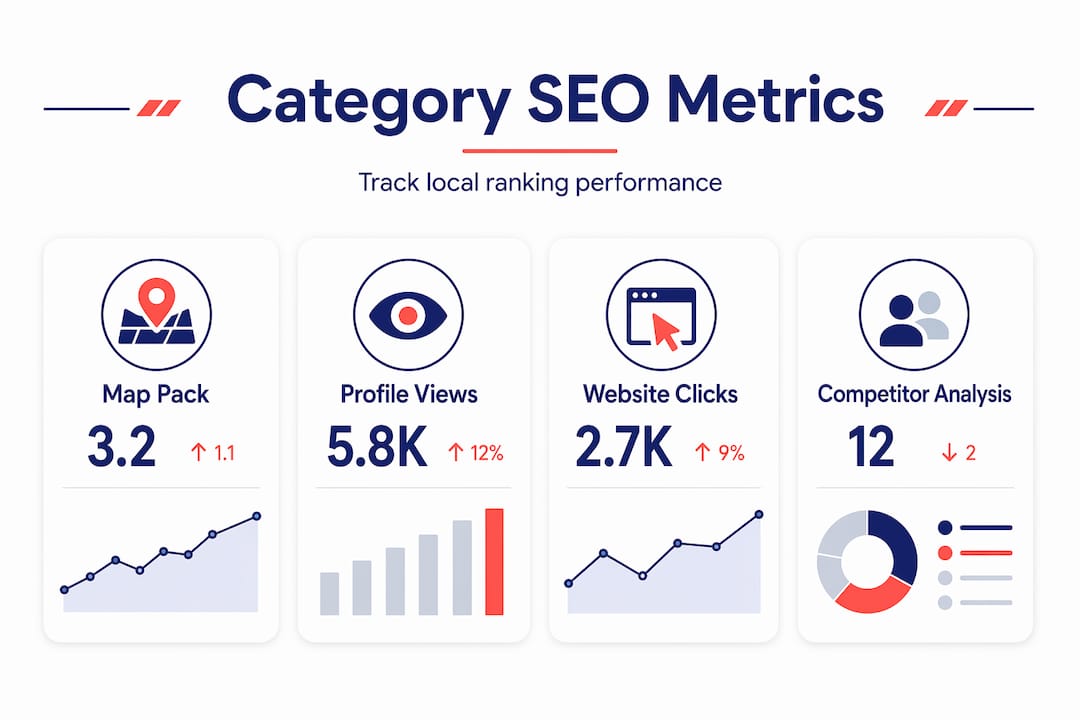
| Metric | What it measures | Where to find it |
|---|---|---|
| Map Pack ranking position | Whether your listing appears in the top three local results | GBP Insights, rank tracking tools |
| Profile views | How often your listing is seen in search and maps | Google Business Profile dashboard |
| Direction requests | How many users navigate to your location | GBP Insights |
| Website clicks from profile | Traffic driven by your GBP listing | GBP Insights, Google Analytics |
| Search query breakdown | Which searches trigger your profile appearance | GBP “Searches” report |
Beyond these native metrics, use competitor analysis to benchmark your category performance. Look at which businesses consistently outrank you for your target keywords and compare their category structure to yours. That gap analysis often reveals quick adjustments worth making.
The most durable results come from treating category SEO as one part of a larger local strategy. Website content aligned with your profile, consistent citations across directories, and a healthy review profile all reinforce the category signals you send Google. Visit your local SEO audit checklist regularly to make sure category optimization is not siloed from your broader efforts.
My take on category SEO after years in local search
I have worked with dozens of independent business owners who spent months chasing backlinks, building citations, and asking for reviews. They were doing real work. But their primary category was off by one level of specificity, and that single issue was capping their Map Pack visibility.
When we corrected the category, results moved faster than anything else we had done. One client running a specialty auto repair shop was categorized as “Auto Repair Shop.” We changed the primary category to “Transmission Shop” because that was the service driving 70 percent of their revenue and the one with the least competition in their local pack. Their ranking for transmission-related searches jumped from outside the top ten to a consistent Map Pack position within four months. Nothing else changed in that window.
What I have found is that business owners underestimate category SEO because it feels too simple. It is a dropdown selection. How could it matter that much? But the simplicity is deceptive. Google gives that field outsized weight precisely because it is one of the few signals a business actively controls and that cannot be faked easily.
My honest advice: spend thirty minutes this week searching your top five revenue keywords in Google Maps. Record the primary categories of every business ranking in the top three positions. Then ask yourself whether your own primary category matches that pattern. If it does not, you have found your highest-leverage SEO change for the next quarter.
SEO experts consistently emphasize that topical authority and precise relevance signals outperform broad coverage. Category selection is where that precision starts.
— Mike
Ready to get your categories working harder
Choosing the right business categories is one of the fastest ways to shift your local search visibility. But it works best when it is part of a complete local SEO strategy, not treated as a one-time checkbox.
At Battleseo, our Google Business Profile optimization service covers category research, competitive analysis, and profile alignment as part of our Local Command Directive™ framework. We look at what categories your top local competitors are using, identify the gaps in your current setup, and build a profile strategy that positions your business as the relevant authority for your highest-value searches. If you want expert support putting this into practice, explore our local SEO services to see how we help independent business owners take command of their local market.
FAQ
What is business category SEO?
Business category SEO is the practice of selecting the right Google Business Profile categories to improve your local search visibility and Map Pack rankings. Your primary category is one of the top-weighted local ranking factors Google uses to match your listing to relevant searches.
How many categories should I select for my Google Business Profile?
Best practice is to choose one specific primary category and two to three closely relevant secondary categories. Filling all available slots with loosely related categories dilutes your relevance signal and can lower your local rankings.
How long does it take to see results from category optimization?
Most businesses see measurable improvements within 3 to 6 months of optimizing their GBP categories, though highly competitive markets can take up to 12 months for significant movement.
Does my website need to match my Google Business Profile categories?
Yes. Aligning your website content with your GBP categories strengthens Google’s confidence in your business classification and produces stronger local ranking signals across both your profile and your site.
Can I create a custom category in Google Business Profile?
No. Google controls a fixed list of approximately 4,000 categories, and you must select from that list only. If your exact business type is not available, choose the most specific category that accurately describes your core offering.