
TL;DR:
- Active management and updates to your Google Business Profile are essential for local search visibility.
- Proper setup as a service-area business with specific locations and video verification boosts ranking.
- Consistent engagement and security measures like review responses and profile monitoring maintain competitive advantage.
You have a Google Business Profile set up, your hours are listed, and you’ve uploaded a few photos. So why are competitors showing up above you in local search? The hard truth is that simply creating a profile is not enough. Millions of U.S. service businesses make this exact mistake, treating their Google Business Profile as a one-time task rather than an active marketing asset. In 2026, the rules have changed significantly, and this guide will walk you through the exact configuration, optimization tactics, and platform updates you need to understand to win more local visibility.
Table of Contents
- What is Google Business and why it matters for service providers
- Setting up and optimizing your service-area profile
- 2026 updates: AI-driven changes and verification essentials
- How to use Google Business for ongoing competitive advantage
- The uncomfortable truth about Google Business for service providers
- Unlock local visibility with expert support
- Frequently asked questions
Key Takeaways
| Point | Details |
|---|---|
| Profile setup matters | A properly configured Google Business Profile is the first step to winning local search traffic for service businesses. |
| 2026 technology shifts | Understanding video verification, Gemini, and schema is crucial to keep your visibility high this year. |
| Ongoing optimization | Regular updates and engagement are necessary for a lasting competitive edge, not just a one-time setup. |
| Security is vital | Protecting your profile from fake edits and extortion scams is more important than ever. |
| Expert support available | Specialized resources and professionals can help you maximize your Google Business impact. |
What is Google Business and why it matters for service providers
Google Business Profile (GBP) is the free platform Google uses to display local business information directly in search results and Google Maps. When someone searches “plumber near me” or “HVAC repair in Austin,” Google pulls from verified business profiles to populate the local results pack. That three-business block at the top of a search page? That is powered by GBP.
Understanding Google Maps SEO basics is the foundation of any local visibility strategy. Your profile is often the first thing a potential customer sees, and it functions like a mini website that Google controls the layout of. It shows your hours, reviews, photos, services, and contact information before a customer ever clicks to your actual website.
For service providers specifically, the profile does something even more important: it signals trust. A well-optimized profile with recent reviews, accurate service listings, and regular updates tells both Google and potential customers that your business is active, legitimate, and worth contacting. A sparse or outdated profile does the opposite.
“Profiles with complete information are significantly more likely to be considered reputable by local searchers. Customers are twice as likely to consider a business trustworthy if the profile is fully filled out.”
Here is what your profile directly influences:
- Search ranking in Google Maps and the local pack
- Customer trust through reviews, photos, and business details
- Conversion rate by making it easy to call, get directions, or book a service
- Brand perception before a customer ever visits your website
The concept of unlocking local SEO starts right here with your Google Business Profile. It is the single highest-leverage free tool available to service-based business owners, and most are not using it to its full potential. To understand what is possible, review top local SEO tips that complement your profile optimization.
With foundational context established, let’s look at how service businesses should actually structure their Google Business setup for maximum impact.
Setting up and optimizing your service-area profile
Not all Google Business Profiles are created equal. If you are a service-based business such as a landscaper, electrician, cleaning company, or home inspector, you likely fall into a specific category called a service-area business (SAB). This distinction matters more than most business owners realize.
According to Google’s own guidelines, service-area businesses should hide their physical address if they do not serve customers at that location. They should then list specific cities or zip codes (not radius-based areas) to define where they operate, with a maximum of 20 service areas allowed.
Here is a comparison of the two main profile types and when to use each:
| Profile type | Best for | Address shown? | Service areas listed? |
|---|---|---|---|
| Service-area business (SAB) | Mobile-only service providers | No (hidden) | Yes, up to 20 cities/zip codes |
| Storefront business | Businesses with a physical location customers visit | Yes | Optional |
| Hybrid business | Businesses with both a storefront and mobile service | Yes | Yes, up to 20 cities/zip codes |
The SAB setup is designed specifically for businesses like plumbers, dog groomers, tutors, and mobile mechanics. If you have been showing your home address on your profile unnecessarily, that is a compliance risk and a trust issue with potential customers.
Here is how to set up or correct your SAB profile correctly:
- Log into your Google Business Profile dashboard and go to the “Business information” section.
- Select “Service-area business” as your business type if you do not serve clients at a physical location.
- Hide your address by removing it from the public-facing profile.
- Add specific service areas using city names or zip codes. Be precise. “Greater Phoenix area” is not a valid entry. “Phoenix, AZ 85001” or “Scottsdale, AZ” are.
- Limit your areas to where you realistically serve clients. Overloading areas you do not actually cover can hurt your ranking relevance.
- For hybrid businesses, enter your storefront address and also add your service areas to cover your mobile territory.
Proper business listing optimization depends on getting this foundation right before adding photos, posts, or services on top of it.
Pro Tip: Do not select a radius when setting your service area. Google’s system performs better with specific named cities or zip codes because they match search intent more precisely. A plumber serving five specific cities will outrank one who claims a 50-mile radius.
Beyond the setup itself, your profile needs to be actively maintained. Add your full service list with clear descriptions. Use the “Products” and “Services” sections to include keywords naturally. Upload high-quality, recent photos. Respond to every review, positive or negative. These profile engagement tips all feed into Google’s understanding of your business and affect where you rank.

2026 updates: AI-driven changes and verification essentials
The landscape for Google Business Profile optimization shifted significantly in 2026. Three major developments are reshaping how service businesses need to approach their profiles, and ignoring them can leave you invisible in both traditional and AI-powered search results.
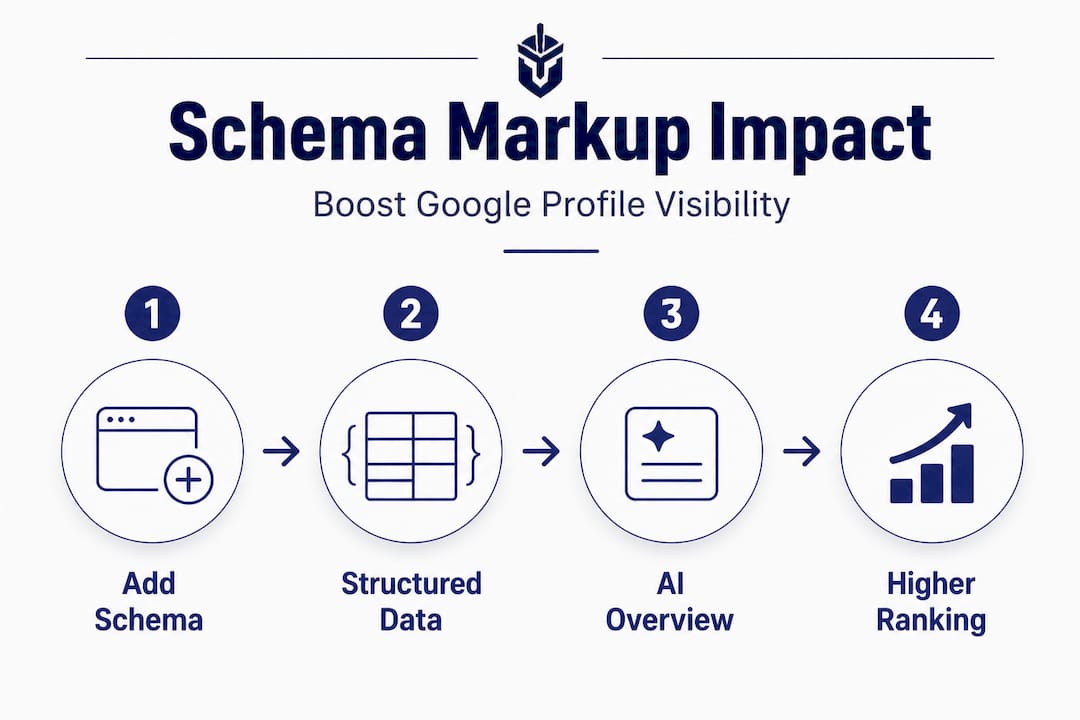
1. AI Overviews now favor structured profiles and schema markup
Google’s AI Overviews (the AI-generated summary answers at the top of search results) are now pulling information from structured business profiles and website schema markup. If your services are not clearly labeled and structured in your profile, and if your website lacks schema markup advantages, you are less likely to appear in these AI-generated answers.
Schema markup is a type of code added to your website that helps search engines understand your content in a structured way. For service businesses, this means adding LocalBusiness schema, Service schema, and Review schema to your site. These signals tell AI Overviews exactly what you do, where you do it, and how customers rate you.
2. Video verification is now the default for SABs
The familiar postcard verification method has been largely phased out for service-area businesses. As of 2026, the default verification method for SABs is video verification, where you record a short walkthrough showing proof of your business identity and operations.
This change catches many business owners off guard. If you are setting up a new profile or re-verifying an existing one, be prepared to film a video that shows your business name on a vehicle, tools, uniforms, or other identifying elements. It is a tighter process, but it exists to protect the integrity of the local search results.
| Verification method | Status in 2026 | Best for |
|---|---|---|
| Video verification | Default and preferred | All new and unverified SABs |
| Postcard mail | Largely deprecated for SABs | Storefront businesses only |
| Phone or email | Case-by-case availability | Established accounts |
| Live video call | Available in some regions | Businesses with complex setups |
3. Gemini now actively blocks fake edits and review extortion
Google has integrated its Gemini AI into the profile management system to detect and block fraudulent activity. This includes fake edits to business listings and extortion-style review manipulation, where bad actors threaten to leave negative reviews unless paid. According to recent platform reporting, Gemini now monitors profile changes and flags suspicious behavior automatically.
This is a meaningful security improvement. Service businesses have historically been vulnerable to competitors submitting false edits to their profiles, changing hours or phone numbers to redirect customers. Gemini’s intervention makes your profile more secure by default.
To stay ahead of all of these changes, it helps to read through the AI search optimization guide and understand why using AI for local visibility is no longer optional. You should also be reviewing content ideas for 2026 to align your posts and updates with what AI search systems are prioritizing.
Pro Tip: After any major profile update, monitor your Google Business Profile dashboard for Gemini-generated notices. These notices can alert you to flagged edits, suspicious review activity, or verification issues that need your attention before they affect your ranking.
How to use Google Business for ongoing competitive advantage
Getting your profile set up correctly and verified is just the beginning. The businesses that dominate local search year after year treat their Google Business Profile like a living, breathing part of their marketing strategy.
Here is how to maintain your competitive edge on an ongoing basis:
-
Respond to every review within 24 to 48 hours. Google factors review response rate into ranking signals. Responding also shows potential customers that you are attentive and professional. A business with 40 reviews and responses to all of them beats a business with 100 reviews and none answered.
-
Post updates at least once per week. The “Posts” feature inside GBP lets you share offers, news, or service highlights. These posts appear on your profile and signal to Google that your business is active. Many service businesses never use this feature at all, which is a competitive gap you can exploit.
-
Keep your services list current. If you add a new service or expand into a new area, update your profile immediately. A service-area business setup that reflects your actual current offerings is more relevant to search queries than an outdated one.
-
Add structured data to your website. Your GBP and your website work together. Schema markup on your site reinforces what is on your profile. AI Overviews are increasingly reading both in tandem, so alignment between the two matters more than ever in 2026, as the recent platform updates confirm.
-
Monitor for fake edits. Even with Gemini protection, you should check your profile weekly. Verify that your phone number, address (if shown), service areas, and business category have not been altered. Unauthorized changes can quietly redirect customers to competitors.
-
Request reviews proactively. After completing a job, send a simple follow-up message with a direct link to your review page. The cadence of new reviews matters as much as the total count.
Staying consistent with these profile engagement tips is what separates businesses that rank reliably from those that spike and fade. It is not a dramatic strategy. It is disciplined, consistent execution of the basics, amplified by the 2026 platform changes that reward structured, active profiles.
The uncomfortable truth about Google Business for service providers
Here is something we see constantly working with local service businesses across the country: most owners set up their Google Business Profile once, then walk away. They check it when a bad review comes in, or when a customer says they could not find the business online. By then, the profile has often stagnated, the verification has lapsed, or a competitor has quietly pulled ahead.
The uncomfortable truth is that Google Business Profile visibility is not a reward for doing the setup correctly one time. It is an ongoing signal to Google that your business is active, legitimate, and relevant. The algorithm favors businesses that engage. It favors profiles that are updated. It rewards businesses that respond to reviews, post regularly, and maintain accurate information.
We also see too many service businesses underestimate the threat of fake edits and fraudulent reviews. These are not rare edge cases. Competitors, disgruntled former employees, or simply bad actors can submit changes to your listing that quietly damage your visibility or misdirect your customers. Even with Gemini’s added security, vigilance matters.
The other piece that most guides skip over is the authority signal your website sends alongside your GBP. Your profile does not exist in a vacuum. Google cross-references your profile with your website, your citations across other directories, your backlinks, and your content. A strong content marketing strategy for SEO that aligns with your service areas reinforces everything your GBP is telling Google about your business.
Local search leadership is not luck. It is earned through consistent, deliberate optimization. Businesses that treat their GBP as an ongoing asset rather than a completed task are the ones that dominate their local market month after month.
Unlock local visibility with expert support
Getting your Google Business Profile right is one of the highest-return moves a service business can make, but the details matter enormously. From correct SAB setup to schema markup and Gemini security, there are layers to this that can make or break your local ranking. If you are ready to stop guessing and start ranking, expert support can close the gap faster than trial and error.
At Battle SEO, we specialize in helping service businesses boost your business visibility through proven local SEO strategies built around your specific market and category. Our local SEO services cover everything from Google Business Profile optimization and citation building to schema markup and AI search positioning. We take on only one business per service category per market, so your competitive edge stays exclusive. Explore our resources or schedule a free consultation to find out where your profile stands and exactly what it would take to move you to the top of local search.
Frequently asked questions
What is a service-area business on Google?
A service-area business (SAB) is a business that travels to customers rather than serving them at a fixed location. SABs should hide their address and list specific cities or zip codes to define where they operate, up to 20 areas.
Do I need to verify my Google Business Profile with a postcard?
No. In 2026, the postcard method is deprecated for service-area businesses. Video verification is now the default, where you submit a short recording that confirms your business identity and legitimacy.
What is Gemini in Google Business and how does it help?
Gemini is Google’s AI system that actively monitors profiles for fake edits and review extortion attempts, helping keep your business listing accurate and protected from fraudulent changes by competitors or bad actors.
How many service areas can I list on Google Business?
You can list up to 20 cities or zip codes as your service areas. Using specific named locations rather than radius-based areas produces more accurate and relevant results in local search.
How does schema markup improve Google Business visibility?
Schema markup on your website helps Google’s AI Overviews understand exactly what services you offer and where, which strengthens your profile’s relevance in AI-generated search answers and increases your chances of appearing in local results.