

TL;DR:
- Mobile SEO for local businesses involves optimizing your website and Google Profile to improve visibility for nearby mobile users.
- Google’s mobile-first indexing prioritizes the mobile site for rankings, making content parity and performance critical for success.
Mobile SEO for local businesses is the practice of optimizing your website and online presence so mobile users searching nearby can find you, trust you, and contact you fast. Google’s mobile-first indexing means your mobile site is the version Google evaluates for rankings, not your desktop version. That single fact changes everything about how you should build and maintain your web presence. Tools like Google Business Profile, Google Search Console, and Core Web Vitals are the three pillars every local business owner needs to understand before touching anything else. Get these right, and your mobile local search visibility compounds over time.
How to set up your Google Business Profile for mobile local SEO
Your Google Business Profile is the single most visible asset you control in mobile local search. When someone searches “plumber near me” or “best pizza in [your city]” on their phone, your profile is what appears in the local pack before they ever visit your website. Claiming and verifying your profile through Google’s official process takes less than a week and costs nothing.
Once verified, focus on these core elements:
- NAP consistency: Your Name, Address, and Phone number must match exactly across your profile, your website, and every directory listing. Even small discrepancies like “St.” versus “Street” confuse Google’s local ranking algorithm.
- Photos and visual content: Google Business Profile photos increase click-through rates significantly. Upload interior shots, exterior shots, team photos, and product images. Profiles with photos receive more direction requests and website visits.
- Business hours: Keep regular hours and special hours (holidays, seasonal changes) updated. A mobile user who shows up at a closed location will leave a negative review, and that review will hurt your rankings.
- Messaging and click-to-call: Enable direct messaging so mobile users can contact you from the search results page without visiting your site. Click-to-call is equally critical. Mobile users want to act immediately, and friction kills conversions.
- Review responses: Responding to every review, positive or negative, signals to Google that your business is active and engaged. Active profiles rank higher in the local pack.
Pro Tip: Post weekly updates to your Google Business Profile using the Posts feature. Google treats fresh activity as a relevance signal, and most of your local competitors are not doing this consistently.
What technical mobile SEO factors most impact local search rankings

Google’s mobile-first indexing is fully rolled out. Google crawls your site using a smartphone user agent, and the mobile version of your content determines your rankings across all devices. If your mobile site is missing content, loads slowly, or breaks on smaller screens, your desktop rankings suffer too.
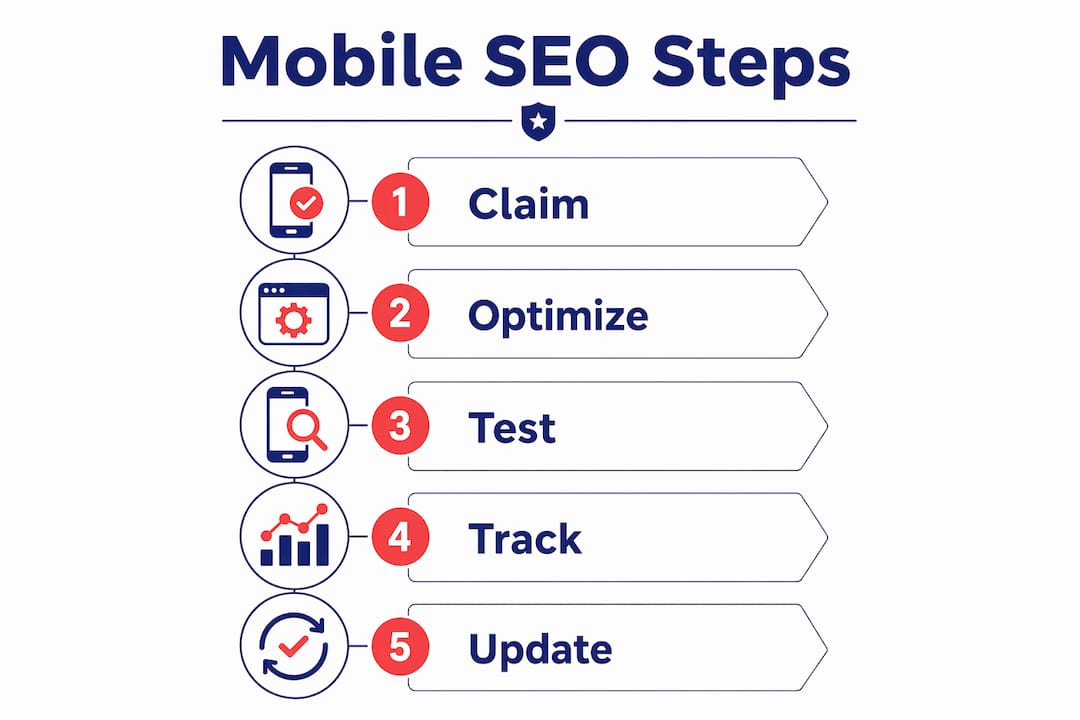
Responsive web design is the foundation. A responsive site adapts its layout to any screen size without requiring a separate mobile URL. This is the most reliable way to pass Google’s mobile-friendliness checks and avoid content parity issues.
Core Web Vitals are the performance benchmarks Google uses to measure real user experience. The 2026 thresholds are:
| Metric | Good Threshold | What It Measures |
|---|---|---|
| LCP (Largest Contentful Paint) | ≤ 2.5 seconds | How fast your main content loads |
| INP (Interaction to Next Paint) | ≤ 200ms | How quickly your page responds to taps |
| CLS (Cumulative Layout Shift) | ≤ 0.1 | How stable your layout is while loading |
These thresholds apply at the 75th percentile of your real users, not just lab tests. Fixing server response time and optimizing above-the-fold content yields the biggest LCP gains. For a local business, a slow-loading homepage is a direct conversion killer.
Content parity between your mobile and desktop versions is non-negotiable. If your desktop site lists your service areas, hours, and testimonials but your mobile version hides them in collapsed sections or omits them entirely, Google evaluates the incomplete version. Every piece of local business information must appear on mobile.
Adding LocalBusiness schema with geo coordinates to your contact or about page helps Google associate your site with your physical location. This structured data markup is one of the clearest signals you can send for mobile local search results.
Pro Tip: Run your site through Google Search Console’s URL Inspection tool and check the “Crawled as” field. If it does not say “Smartphone Googlebot,” your mobile-first indexing setup has a problem that needs fixing immediately.
How to optimize content and keywords for mobile local search
Mobile “near me” searches have grown over 500% and represent users with high purchase intent. These searchers are not browsing. They are ready to buy, call, or visit. Your content strategy needs to match that intent directly.
Start with keyword research that targets location-specific phrases. “Emergency electrician Austin TX” and “gluten-free bakery downtown Chicago” are the kinds of phrases that convert on mobile. Use Google Keyword Planner or tools like Semrush to find local variants with real search volume. Build individual location pages if you serve multiple neighborhoods or cities.
Here is how to structure your content for mobile consumption:
- Short paragraphs: Mobile users spend about 2 minutes per session versus 5 minutes on desktop. Dense paragraphs get skipped. Keep paragraphs to 3 sentences maximum on service pages.
- Front-loaded answers: Put the most important information in the first sentence of every section. Mobile users scroll fast and read selectively.
- Optimized meta titles and descriptions: Your meta title should include your primary service and city within 60 characters. Your meta description should include a clear call to action within 155 characters. These appear directly in mobile SERPs and influence click-through rates.
- Location-specific content: Write blog posts about local events, seasonal services, or neighborhood-specific topics. A roofing company in Denver writing about hail season preparedness will rank for searches that a generic roofing page never will.
- Visual content blocks: Use images, icons, and expandable FAQ sections to break up text. These formats are easier to navigate on a touchscreen and reduce bounce rates.
For local search marketing tips that go deeper on content strategy, Battleseo has published a detailed guide covering keyword gap analysis and intent mapping for independent business owners.
What mobile UX improvements boost engagement and conversions
Mobile user experience is a direct ranking factor. Google measures engagement signals like bounce rate, time on page, and conversion actions. A technically sound site that is frustrating to use will still lose rankings over time.
Follow these steps to build a mobile UX that converts:
- Design for one-handed use. Most mobile users hold their phone with one hand and tap with their thumb. Place your primary navigation menu and call-to-action buttons in the lower half of the screen where thumbs naturally reach.
- Use large tap targets. Buttons should be at least 48×48 pixels with adequate spacing between them. Small, crowded buttons cause accidental taps and frustration, both of which increase bounce rates.
- Place CTAs above the fold. Your phone number, “Get a Free Quote” button, or “Book Now” link should be visible without scrolling. Mobile users who cannot find a contact option within seconds will leave.
- Simplify forms. A contact form with 10 fields will not get completed on mobile. Reduce forms to name, phone, and one question. Use autofill-compatible field labels so browsers can pre-populate information.
- Integrate maps and directions. Embed a Google Maps widget on your contact page and link your address directly to Google Maps. Mobile users searching for your location want to tap once and get directions, not copy-paste an address.
- Enable click-to-call everywhere. Your phone number should be a tappable link on every page, not just the contact page. Use the HTML "tel:` attribute so tapping the number opens the phone dialer instantly.
The mobile-first design principle is not just about aesthetics. It is about removing every barrier between a mobile user and the action you want them to take.
How to test, audit, and track your mobile SEO performance
Testing is where most local businesses stop too early. They fix an obvious issue, check one page on one device, and move on. Real mobile SEO audits require systematic testing across tools and devices.
Use this comparison to choose the right tool for each task:
| Tool | Best For | Cost |
|---|---|---|
| Google Search Console | Mobile indexing status, Core Web Vitals by URL | Free |
| Google PageSpeed Insights | LCP, INP, CLS scores with fix recommendations | Free |
| Lighthouse (Chrome DevTools) | Full performance audit on any device viewport | Free |
| Google Business Profile Insights | Profile views, direction requests, call clicks | Free |
Google Search Console’s URL Inspection tool verifies whether Google is crawling your pages as a smartphone. The Core Web Vitals report inside Search Console shows which specific URLs are failing thresholds, so you can prioritize fixes by traffic volume rather than guessing.
Regular testing on multiple devices catches issues that emulators miss. Chrome DevTools device emulation is useful for quick checks, but testing on a real iPhone and a mid-range Android device reveals rendering problems and tap target issues that simulators do not replicate. For a structured approach to auditing your full site, Battleseo’s guide on website SEO audits walks through the complete process for local businesses.
Key takeaways
Mobile SEO success for local businesses requires parallel action on technical performance, content parity, Google Business Profile optimization, and mobile UX, all working together rather than in isolation.
| Point | Details |
|---|---|
| Google Business Profile is your first priority | Claim, verify, and actively maintain your profile to appear in the mobile local pack. |
| Mobile-first indexing is already active | Google ranks your site based on the mobile version, so mobile flaws reduce all rankings. |
| Core Web Vitals thresholds are measurable targets | Aim for LCP ≤ 2.5s, INP ≤ 200ms, and CLS ≤ 0.1 using free Google tools. |
| Content parity protects your local rankings | Every service, location, and contact detail must appear on your mobile site, not just desktop. |
| UX improvements drive conversions, not just rankings | Large tap targets, simplified forms, and above-the-fold CTAs turn mobile visitors into customers. |
What I’ve learned after auditing hundreds of local business mobile sites
Most local business owners I work with have the same blind spot. They assume that because their site “looks fine” on their own phone, it is performing well. That assumption costs them rankings and customers every single day.
The real issue is that mobile SEO operates on two tracks simultaneously. The first track is technical: making sure Google can crawl your mobile site, find all your content, and measure your Core Web Vitals accurately. The second track is experiential: making sure real users can navigate your site, find your phone number, and take action without frustration. Most audits I see focus on one track and ignore the other.
The most common mistake I find is content parity failure. A business owner or their developer built a “clean” mobile site by hiding or removing content that felt cluttered on small screens. Service area pages, testimonials, and detailed service descriptions get stripped out. Google then evaluates the stripped version and ranks the business lower than competitors who kept their full content visible on mobile.
The second most common mistake is treating Core Web Vitals as a one-time fix. These scores change as you add new images, plugins, or third-party scripts. A site that passed in January can fail by June. Build a monthly check into your routine using Google Search Console and PageSpeed Insights. It takes 15 minutes and catches problems before they compound.
My advice: treat your mobile SEO audit as a living process, not a project with a finish line. The businesses that win in local search are the ones that check their numbers regularly and adjust based on real user data, not assumptions.
— Mike
How Battleseo helps local businesses win on mobile search
If you have read this far, you already understand that mobile SEO for local businesses is not a single fix. It is a system of connected optimizations that compound over time.
Battleseo works exclusively with independent business owners, taking on only one business per service category per market. That means when we optimize your mobile presence, we are working for you, not your competitor down the street. Our Local Command Directive™ framework covers Google Business Profile optimization, LocalBusiness schema markup, Core Web Vitals remediation, and location-specific content strategy. If you are ready to stop guessing and start ranking, explore our local SEO services or get a head start with our guide on boosting local visibility fast.
FAQ
What is mobile SEO for local businesses?
Mobile SEO for local businesses is the process of optimizing your website and Google Business Profile so mobile users searching locally can find, trust, and contact you. It covers technical performance, content structure, and user experience on mobile devices.
How does Google’s mobile-first indexing affect local rankings?
Google uses your mobile site as the primary version for ranking decisions. If your mobile site is missing content or loads slowly, your rankings drop across all devices, not just mobile.
What are the most important Core Web Vitals thresholds for 2026?
The targets are LCP at or below 2.5 seconds, INP at or below 200 milliseconds, and CLS at or below 0.1. You can measure all three for free using Google Search Console and PageSpeed Insights.
How do I check if Google is crawling my site as a mobile device?
Use the URL Inspection tool inside Google Search Console and look for “Crawled as: Smartphone” in the results. If it shows a desktop crawler, your mobile-first indexing setup needs attention.
Why do “near me” searches matter for local business mobile SEO?
“Near me” searches have grown over 500% and represent users with immediate purchase intent. Ranking for these queries requires a verified Google Business Profile, consistent NAP data, and location-specific content on your site.