
TL;DR:
- Verify and complete accurate business information to enhance local visibility on Google.
- Regularly update and engage with photos, posts, and reviews to maintain profile relevance.
- Monitoring insights helps measure actions like calls and directions to assess optimization impact.
You already have a Google Business Profile. Maybe you set it up a while back, added your address and phone number, and figured that was enough. But if local customers aren’t finding you, calling you, or walking through your door, the profile probably isn’t doing its job. Simply existing on Google isn’t the same as being visible. This guide walks you through exactly what to prepare, how to optimize every field, which mistakes to avoid, and how to measure whether your efforts are actually paying off.
Table of Contents
- What you need before optimizing your Google Business Profile
- Step-by-step: How to fully optimize your profile
- Managing attributes and avoiding costly mistakes
- Tracking your improvements: Insights and ongoing engagement
- What most Google Business Profile guides miss (and what actually moves the needle)
- Unlock more local growth with professional optimization support
- Frequently asked questions
Key Takeaways
| Point | Details |
|---|---|
| Verification is essential | You must verify your Google Business Profile to unlock editing and optimization features. |
| Complete all core details | Accurate, up-to-date information is critical for local search results and customer trust. |
| Avoid policy violations | Never keyword-stuff your business name or choose irrelevant categories; these mistakes can get your profile suspended. |
| Leverage attributes and updates | Adding relevant attributes and posting updates regularly keeps your profile fresh and helps your business stand out. |
| Measure what matters | Track profile engagement (calls, directions, clicks) with GBP Insights and adjust your strategy for what drives real results. |
What you need before optimizing your Google Business Profile
Before you start making changes, you need to make sure the foundation is solid. Trying to optimize a profile that isn’t verified or is missing critical information is like decorating a house that hasn’t been built yet. Preparation saves time and prevents mistakes down the line.
The most important requirement is verification. Keep your core business information accurate by verifying your profile first, because your Business Profile must be verified before you can edit and optimize core details. Without verification, most edits simply aren’t available to you. Google offers several verification methods including postcard, phone, email, or video, depending on your business type and location.
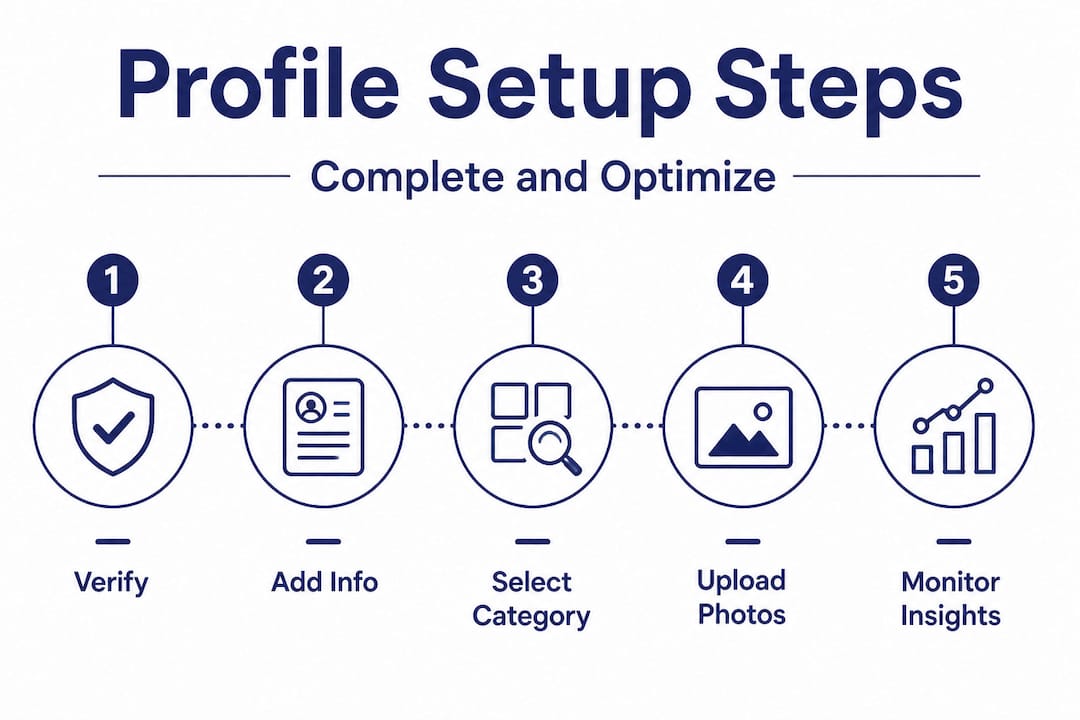
Once verified, you’ll want to gather everything you need before you start editing. Having your materials ready prevents incomplete updates and saves you from making multiple trips back to fix things.
Here’s what to gather before you start:
- Your official legal business name (exactly as it appears in the real world)
- Physical address or service area, depending on your business model
- Primary phone number and, if applicable, a secondary number
- Website URL and any social media profile links
- Current and accurate business hours, including holiday hours
- A keyword-rich but natural business description (750 characters max)
- High-quality photos of your storefront, interior, products, and team
- Your logo in a clean, high-resolution format
- Video clips if you have them (up to 30 seconds, under 75 MB)
- A clear list of your primary and secondary business categories
The Profile Strength indicator is only available for verified listings, and it gives you a visual guide for what’s missing or incomplete. After verification, check it immediately. It shows you at a glance which sections need attention and prioritizes the most impactful improvements.
| Prerequisite | Why it matters | Action needed |
|---|---|---|
| Verified account | Required to make any edits | Complete Google’s verification process |
| Accurate NAP | Consistency builds trust and rankings | Double-check name, address, phone |
| Updated hours | Prevents customer frustration | Review and correct seasonal/holiday hours |
| Real photos | Increases engagement and clicks | Upload at least 10 quality images |
| Correct categories | Determines which searches you appear in | Research competitors’ categories |
| Business description | Improves relevance signals | Write a natural, service-focused description |
Pro Tip: When selecting categories, search for your top competitors in Google Maps and note which primary categories they’re using. Your primary category has the most impact on which searches you appear in, so choosing the wrong one can quietly suppress your visibility for months.
When optimizing your listing is done right, it starts here, with clean, verified, complete information that Google can trust.
Step-by-step: How to fully optimize your profile
Once everything is ready, follow these steps to create a standout, discoverable profile in local search. This isn’t about cutting corners or rushing through checkboxes. Each step builds on the last, and skipping one can reduce the impact of everything else.
-
Claim and verify your profile if you haven’t already. Go to business.google.com and follow the prompts. Choose the fastest verification method available for your business type.
-
Complete your core information with precision. Your business name should match what’s on your signage, website, and any other listings. Inconsistencies confuse Google and erode trust. Fill in your full address or service area, a direct phone number, and your website URL.
-
Select your primary category with care. This single field has an outsized impact on your local rankings. Choose the category that most accurately describes your main business function, not just one that sounds good. Then add two to three secondary categories for supporting services.
-
Write a compelling business description. You have 750 characters. Use them to clearly describe what you do, who you serve, and what makes you different. Avoid keyword stuffing here. Google reads the description for relevance, but it doesn’t use it as a direct ranking factor, so write it for your customers first.
-
Upload real photos and videos. Businesses with photos receive 42% more direction requests than those without them. Add your logo, a cover photo, team photos, product shots, and images of your work environment. Authentic photos outperform stock images every time.
-
Use attributes to signal specifics. Does your business offer curbside pickup? Is it women-owned? Wheelchair accessible? These attributes appear in filtered searches and help you connect with customers who are looking for exactly what you offer.
-
Post regular updates. Google Posts let you share offers, events, new products, and announcements directly on your profile. Active profiles are treated as more relevant by Google’s algorithm.
-
Request and respond to reviews. Ask satisfied customers to leave a review after every positive interaction. Then respond to every review, positive and negative. Engagement signals to Google that your profile is active and credible.
Follow Google’s Business Profile representation guidelines at every step to stay within policy and avoid suspension. Violating these guidelines, even unintentionally, can get your profile removed from search results.
| Step | Common mistake | Impact on profile |
|---|---|---|
| Business name | Adding keywords or extra words | Suspension risk, ranking drop |
| Category selection | Choosing vague or irrelevant categories | Invisible in target searches |
| Photos | Using stock photos | Lower engagement, less trust |
| Description | Keyword stuffing | No benefit, possible penalty |
| Reviews | Ignoring negative reviews | Trust damage, lower conversion |
| Posts | Posting once and stopping | Profile appears inactive |
The US Chamber of Commerce recommends a consistent cycle: claim and verify, keep info updated, upload images, share business updates, ask for reviews, and track insights. That cycle, when maintained, compounds over time.
Pro Tip: For advanced Google Business Profile tips that go beyond the basics, focus on your Q&A section. Seed it with five to ten common questions and write your own answers. This controls the narrative and gives Google more relevant content to index on your profile.
For local SEO visibility tips that complement your GBP work, think about your website’s alignment with your profile. Your site’s NAP information, location pages, and service content should all reinforce what’s on your Google Business Profile.
Managing attributes and avoiding costly mistakes
As you fine-tune your profile details, paying attention to attributes and policy compliance is crucial to keeping your account safe and effective. Attributes are one of the most underused features in Google Business Profile optimization, and they’re more powerful than most business owners realize.
Attributes help you appear in relevant searches and may be suggested by Google or populated by users based on their experiences at your location. They fall into two main types: factual attributes (like “free Wi-Fi” or “outdoor seating”) and subjective attributes (like “good for kids” or “lively atmosphere”) which are added based on customer feedback. You control the factual ones directly.
Key attributes to consider adding:
- Accessibility features (wheelchair-accessible entrance, parking, restrooms)
- Payment methods accepted (credit cards, digital wallets, checks)
- Service options (curbside pickup, delivery, in-store shopping, online appointments)
- Business identity markers (women-owned, veteran-owned, LGBTQ+ friendly)
- Health and safety features if applicable
- Amenities specific to your industry (free consultation, same-day service)
To manage your attributes, log into your Google Business Profile dashboard, click “Edit profile,” and scroll to the “More” section. Google may also suggest attributes based on your category, so check this section regularly as options can change.
Now for the mistakes that can actually hurt you. Improper use of business name, description, or selecting irrelevant categories can result in suspension. This is not a minor inconvenience. A suspended profile disappears entirely from search and Maps until the issue is resolved, which can take days or weeks.
Warning: Google actively monitors Business Profiles for guideline violations. Keyword-stuffing your business name, adding a keyword-heavy description that doesn’t reflect your real business, or selecting categories that don’t match your actual services can trigger an automatic suspension. Recovery requires submitting a reinstatement request and can take significant time.
Other costly mistakes include ignoring user-suggested edits. Google allows anyone to suggest changes to your profile. If you don’t monitor and reject inaccurate suggestions, your hours, address, or even business name could be changed by someone who doesn’t know your business. Check your profile dashboard weekly for pending edit suggestions.
Pro Tip: Make sure your real-world business name matches your profile exactly. If your sign says “Miller’s Plumbing” but your profile says “Miller’s Plumbing Services LLC,” that inconsistency can confuse both Google and potential customers. Consistency is a trust signal. For standing out locally in a competitive market, every trust signal counts.
Tracking your improvements: Insights and ongoing engagement
Optimizing your profile isn’t a one-time job. It’s about actively measuring outcomes and keeping your business fresh in local search. The good news is that Google gives you the data you need to understand what’s working.

GBP Insights (now integrated into the Google Business Profile dashboard and also available through Google Search) shows you how customers find and interact with your profile. GBP Insights allows you to track profile actions like calls, direction requests, and website clicks to measure engagement beyond just how many people saw your profile.
| Metric | What it tells you | How to use it |
|---|---|---|
| Search queries | What keywords triggered your listing | Align website content with top queries |
| Profile views | How many times your profile was seen | Benchmark and track week over week |
| Website clicks | Traffic sent from your profile | Correlate with website analytics |
| Calls | Direct calls initiated from your profile | Track against time of day and day of week |
| Direction requests | People navigating to your location | Gauge foot traffic interest |
| Photo views | Engagement with your visual content | Test different photo types for higher views |
Here’s how to systematically measure engagement and act on it:
-
Set a baseline. Screenshot or export your Insights data immediately after completing your optimization. This gives you a comparison point.
-
Track weekly for the first month. Changes in calls, direction requests, and website clicks will start showing within two to four weeks of a major update.
-
Identify your best-performing content. Check which photos get the most views and which posts drive the most clicks. Then produce more of what works.
-
Monitor review velocity. Track how many new reviews you’re getting each month. If the number drops, reinstate your review request process with customers.
-
Adjust based on search queries. If customers are finding you through queries you didn’t expect, consider adding those services or descriptors to your profile and website content.
The data you get from Insights connects directly to getting found by customers in a consistent and scalable way. Pair your GBP data with Google Maps SEO strategies for a complete picture of how your local presence is performing across both search and Maps.
What most Google Business Profile guides miss (and what actually moves the needle)
Now that you know how to measure and maintain a high-performing profile, here’s a ground-level take you won’t see in most guides.
Most articles about Google Business Profile optimization treat it like a form-filling exercise. Fill in every field, hit 100% on the Profile Strength indicator, and you’re done. But that’s not how real local visibility works.
The businesses we see consistently win in local search aren’t just complete. They’re active and authentic. A profile that was fully optimized eight months ago and hasn’t been touched since will almost always be outperformed by a profile that’s slightly less “complete” but has fresh photos from last week, a new post from three days ago, and a stream of real customer reviews with thoughtful owner responses.
Profile Strength is a checklist. Google’s algorithm is a quality signal. Those are two different things. A business can score well on the checklist and still rank poorly if the profile lacks freshness, authentic engagement, and consistency with the rest of the web.
Real engagement, specifically calls, direction requests, and actual visits that generate reviews, is a far more meaningful measure of success than any internal profile score. When customers are calling you directly from your profile or navigating to your location, that’s a signal Google registers. That’s the behavior loop that strengthens your local authority over time.
The other thing most guides skip over is the importance of local content marketing as a reinforcing strategy. Your GBP doesn’t exist in isolation. The content on your website, your mentions in local publications, your citations across directories, and even your social media presence all contribute to how Google perceives your authority in your market.
Pro Tip: Instead of optimizing toward 100% on a status bar, iterate based on what gets real customer responses. Which photo type generates the most views? Which post format earns the most clicks? Use those patterns to guide your next month’s updates.
Unlock more local growth with professional optimization support
You’ve now got a clear roadmap for turning your Google Business Profile into a genuine local visibility asset. But knowing what to do and having the time and expertise to do it consistently are two very different things.
If you want faster results and a more strategic approach, Battle SEO’s local SEO services are built specifically for independent business owners who want to dominate their local market without figuring it all out alone. Our Local Command Directive™ framework combines GBP optimization with authority link building, citation cleanup, and content strategy, so every part of your local presence reinforces the others. You can also explore our AI optimization tips to extend your reach beyond Google into platforms like ChatGPT and Perplexity. And if you’re ready to start with your business listing optimization, we can walk you through exactly where you stand today.
Frequently asked questions
Can my business appear in Google search without a Business Profile?
No. Only verified and completed profiles are eligible to appear in local searches and Google Maps results. Without verification, your business won’t show up in the local pack.
How often should I update my Google Business Profile?
Update your profile whenever business details change, and aim to share new posts, photos, or offers at least once a month. More frequent updates signal to Google that your profile is active and relevant.
What happens if I use keywords in my business name to try and rank higher?
Keyword-stuffing your business name violates Google’s guidelines and can result in your profile being suspended or removed from search results entirely.
Do customer reviews really impact my profile’s performance?
Yes. Asking for reviews and responding to them is a core part of GBP optimization. Active review engagement improves trust signals and helps your profile compete in local search rankings.
How do I know if my profile updates are making a difference?
Monitor GBP Insights to track changes in calls, direction requests, and website visits. Tracking engagement metrics after each round of updates helps you see exactly which improvements are driving real customer actions.
Recommended
- 13 Tips to Improve Google Business Profile Engagement 2025
- What Is Google Maps SEO? Boost Local Visibility & Win More Customers
- Optimize your business listing to dominate local search
- Top 5 Local SEO Tips To Get Found By More Customers
- Optimize Google My Business for higher visibility and leads
- 7 Tips to Boost Search Results with Google Business Profile