

TL;DR:
- Learning how to audit your website’s SEO helps identify issues that keep your site from ranking higher on Google.
- Focusing on technical foundations, user experience, on-page content, local signals, and backlinks ensures comprehensive optimization and long-term success.
You have a website, you are showing up on Google somewhere on page four, and customers are calling your competitor instead. The frustration is real, and the fix is not as complicated as most people make it sound. Learning how to audit website SEO is the single most practical step you can take to understand why your site is underperforming and what to change first. This guide walks you through each stage of an SEO website evaluation, from technical foundations to local signals, so you can stop guessing and start making fixes that actually move the needle for your business.
Table of Contents
- Preparing for your SEO audit: tools and prerequisites
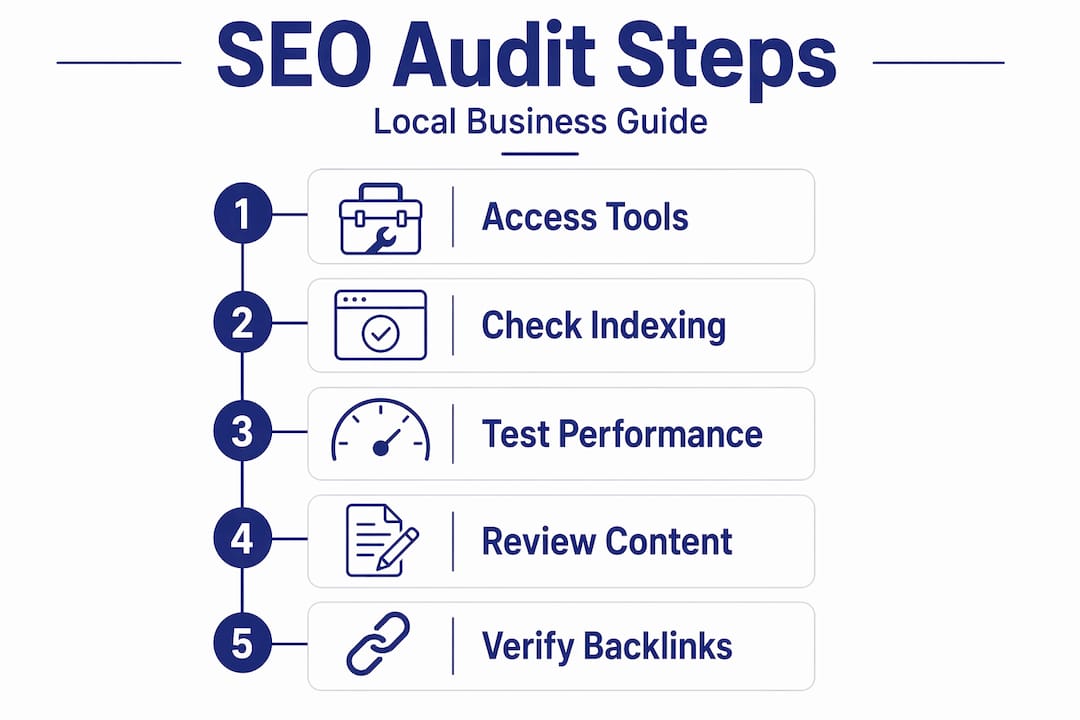
- Step 1: Conduct a technical SEO audit to ensure crawlability and indexing
- Step 2: Evaluate site performance and Core Web Vitals for user experience
- Step 3: Audit on-page SEO and content alignment to your customers’ intent
- Step 4: Check local SEO signals to attract nearby customers
- Step 5: Review backlink profile and tracking integrity for sustained SEO success
- Why a prioritized, recurring SEO audit is the smartest investment for local business owners
- Boost your local SEO with expert support from Battle SEO
- Frequently asked questions
Key Takeaways
| Point | Details |
|---|---|
| Start with tools | Use Google Search Console, Google Analytics, and a site crawler to gather essential SEO data. |
| Fix technical issues first | Prioritize crawlability and indexation problems before optimizing content for faster results. |
| Improve user experience | Focus on Core Web Vitals and mobile usability to enhance site speed and visitor engagement. |
| Optimize local signals | Audit and maintain your Google Business Profile, NAP consistency, and reviews for local SEO success. |
| Make audits recurring | Regular SEO audits prevent regressions and keep your site competitive over time. |
Preparing for your SEO audit: tools and prerequisites
Before you touch a single page, get your tools and access in order. A good audit starts with Google Search Console, Google Analytics 4, and a site crawler like Screaming Frog. These three tools together give you a complete picture of how search engines see your site and how real visitors behave on it. Skipping this setup means you are diagnosing a problem without the right instruments.
Here is what you need ready before you start:
- Google Search Console (free): shows which pages are indexed, what queries bring traffic, and where crawl errors exist
- Google Analytics 4 (free): reveals how users navigate your site, where they drop off, and which pages convert
- Screaming Frog SEO Spider (free up to 500 URLs): crawls your site the way a search engine does, flagging broken links, missing tags, and redirect issues
- Access to your CMS (WordPress, Squarespace, etc.): you will need this to implement fixes quickly after the audit
- Hosting control panel access: useful for checking server-level settings like HTTPS and page speed configurations
For accurate diagnostics, pull at least 90 days of data from Google Search Console and Analytics before you begin. Anything shorter can misrepresent seasonal patterns or recent traffic dips. A concise SEO audit checklist for business owners can help you organize each phase so nothing slips through the cracks.
| Tool | Cost | Primary use |
|---|---|---|
| Google Search Console | Free | Indexing, crawl errors, query data |
| Google Analytics 4 | Free | Traffic behavior and conversions |
| Screaming Frog | Free / $259/yr | Site crawl, broken links, redirects |
| Ahrefs Webmaster Tools | Free | Backlink profile overview |
| PageSpeed Insights | Free | Core Web Vitals and performance |
With the right tools and access ready, you are set to evaluate your website’s SEO health from the ground up.
Step 1: Conduct a technical SEO audit to ensure crawlability and indexing
Technical SEO is the foundation everything else sits on. Fixing crawl errors and indexation issues first prevents wasting time on content that search engines cannot even find. A beautifully written service page means nothing if Google is blocked from reading it.
Start with these checks:
- robots.txt file: open it at yourdomain.com/robots.txt and confirm it is not accidentally blocking important pages or directories
- XML sitemap: verify it includes only canonical, indexable URLs, then confirm it is submitted in Google Search Console under the Sitemaps report
- Screaming Frog crawl: run a full crawl and filter for 404 errors, redirect chains longer than two hops, and orphan pages (pages with no internal links pointing to them)
- Canonical tags: check that duplicate pages point to the correct canonical URL so ranking authority is not split
- HTTPS: every page should load securely; mixed content warnings can suppress rankings
Use the Pages report in Google Search Console and focus on the “Not indexed” tab. Look specifically for statuses like “Crawled, currently not indexed” and “Duplicate without user-selected canonical.” These two statuses alone are responsible for a large share of ranking problems local business sites encounter.
Pro Tip: If Screaming Frog finds more than 10% of your pages returning errors or stuck in redirect chains, fix those before moving to any other audit step. The ratio matters because it signals to Google that your site maintenance is poor.
Understanding search engine optimization basics can help you interpret crawl results with more confidence, especially if some of these concepts are new to you.
Step 2: Evaluate site performance and Core Web Vitals for user experience
Google uses page experience signals as a ranking factor, and slow or unstable pages push visitors away before they ever read your content. Check your Core Web Vitals in Google Search Console, aiming for LCP (Largest Contentful Paint) under 2.5 seconds, INP (Interaction to Next Paint) under 200 milliseconds, and CLS (Cumulative Layout Shift) under 0.1.
Follow these steps for an effective performance evaluation:
- Open the Core Web Vitals report in Google Search Console and sort pages into “Poor,” “Needs improvement,” and “Good” groups
- Validate your top pages with PageSpeed Insights to get specific diagnostics for each performance issue
- Compress images using a format like WebP and set explicit width and height attributes to reduce layout shift
- Remove or defer render-blocking JavaScript that delays when the page becomes visible
- Add preconnect resource hints for third-party fonts and analytics scripts your site loads on every page
A one-second delay in page load time can reduce conversions by up to 7%, according to industry research. For a local business generating 50 leads a month, that is a real, measurable loss in revenue.
Checking your SEO audit checklist for business performance alongside PageSpeed results helps you prioritize which fixes will have the broadest impact across multiple pages at once.
Pro Tip: Test performance on a real mobile connection, not just desktop. Most local search queries happen on phones, and Google primarily uses the mobile version of your site for ranking.
Step 3: Audit on-page SEO and content alignment to your customers’ intent
On-page SEO is where most local business sites have the most to gain quickly. A full SEO audit includes analyzing title tags, meta descriptions, header hierarchy, content quality, and keyword intent alignment so every page earns its place in search results.
Check each of the following elements across your most important pages:
- Title tags: each page needs a unique title that places the primary keyword near the front and stays under 60 characters
- Meta descriptions: keep them under 155 characters, write them to describe the page clearly, and include a natural call to action
- Header structure: use one H1 per page that matches the page’s topic, then H2 and H3 tags to organize subtopics logically
- Keyword intent match: a page targeting “emergency plumber in Austin” should be transactional and direct, not an 800-word blog post explaining plumbing history
- Content freshness: pages showing declining traffic in Google Analytics may need updated statistics, new examples, or an expanded section to regain relevance
One issue that surprises many business owners is keyword cannibalization. This happens when two or more pages on your site compete for the same search query. For example, if you have a general “services” page and a specific “roof repair” page both targeting “roof repair near me,” they split your authority instead of concentrating it. The fix is to consolidate those pages or clearly differentiate their focus.
Use local SEO content strategies to ensure your content speaks directly to the search intent of customers in your specific city or region, not just generic buyers.
Step 4: Check local SEO signals to attract nearby customers
Local SEO is where independent business owners have a real competitive advantage over national brands. Google Business Profile, NAP accuracy, and customer reviews are vital parts of a complete SEO audit for local businesses. These signals directly influence whether you appear in the Google Maps pack, which shows up above the regular organic results for most local searches.
Run through this checklist for your local SEO audit:
- Google Business Profile (GBP): confirm it is claimed, fully filled out with your correct category, hours, services, and photos
- NAP consistency: your business name, address, and phone number must be identical across your website, GBP, Yelp, Facebook, and every other directory
- Customer reviews: actively request reviews after service, and respond professionally to every review including negative ones
- Local citations: use a citation tracking tool to find directory listings with outdated addresses or duplicate entries, then correct or remove them
- Local business schema: add structured data markup to your website’s contact or location page so search engines can read your business details in a machine-readable format
| Local SEO element | What to check | Impact level |
|---|---|---|
| Google Business Profile | Completeness and accuracy | Very high |
| NAP consistency | Match across all directories | High |
| Customer reviews | Volume, recency, responses | High |
| Local citations | Accuracy and no duplicates | Medium |
| Local business schema | Present and error-free | Medium |
Pro Tip: Even one NAP inconsistency across major directories like Yelp or the Better Business Bureau can create confusion for search engines and suppress your Maps ranking. Consistency is not optional.
Dive deeper into Google Business Profile optimization and use a local SEO signals checklist to make sure nothing is overlooked.
Step 5: Review backlink profile and tracking integrity for sustained SEO success
Your backlink profile is essentially your site’s reputation in the eyes of Google. Backlink audits identify toxic links, lost valuable backlinks, and new link opportunities that are critical for long-term SEO. Low-quality links from unrelated or spammy sites can pull your rankings down quietly over time.
Here is how to audit your backlinks and tracking setup:
- Download your full backlink profile using Ahrefs Webmaster Tools (free tier is sufficient for most local sites)
- Filter for links from sites with very low domain authority, irrelevant topics, or patterns that look like paid link schemes
- Only consider disavowing links if Google has already issued a manual action against your site; disavowing prematurely can remove links that are actually helping you
- Identify valuable links you had that are now returning 404 errors, then reach out to those sites to request the link be updated to your live URL
- Compare your backlink profile against a local competitor ranking above you to find link gap opportunities worth pursuing
On the tracking side, confirm Google Analytics 4 is firing correctly on every page. Check that form submissions, phone number clicks, and appointment bookings are recorded as conversion events. Without reliable tracking, you cannot measure whether your audit changes are working.
Pro Tip: Add a filter in GA4 to exclude your own IP address from traffic data. Internal visits from you and your team can distort the numbers you rely on to measure real customer behavior.

Review backlink and analytics audit tips to understand how to interpret your backlink data in the context of your local market.
Why a prioritized, recurring SEO audit is the smartest investment for local business owners
Here is the uncomfortable truth most audit guides skip: order matters far more than thoroughness. We have seen local business owners spend three months rewriting website content only to discover afterward that their most important pages were blocked from indexing entirely. Every hour spent on content was wasted. Fixing crawl and indexing issues first prevents exactly that kind of invisible waste.
The 80/20 principle applies directly to SEO audits. In most local business websites, roughly 20% of the issues are responsible for 80% of the ranking drag. Technical errors, a missing or incorrect robots.txt setting, unsubmitted sitemaps, and NAP inconsistencies tend to be high-impact problems that are also fast to fix. Content gaps and backlink building come after the foundation is solid, not before.
Frequency matters too. SEO audits should be recurring, not a one-time project. A plugin update on your WordPress site can introduce new redirect errors overnight. A Google algorithm update can shift what content performs. Running lightweight quarterly checks and a fuller annual audit gives you the early warning system to catch regressions before they turn into ranking drops you spend months recovering from.
Think of your website like a physical storefront. You would not deep-clean it once and assume it stays spotless forever. The same logic applies to recurring SEO audit guidance. Treat auditing as a regular part of your business operations, not an emergency response.
Boost your local SEO with expert support from Battle SEO
Knowing how to audit website SEO is genuinely empowering. Putting everything into action consistently is where most independent business owners run into limits on time and expertise. That is exactly where Battle SEO steps in.
Battle SEO specializes in local SEO services built exclusively for independent business owners. We handle hands-on Google Business Profile optimization, authority backlink building, citation management, and ongoing audit monitoring so your site stays competitive month after month. Our exclusivity model means we work with only one business per category per market, so your investment goes entirely toward outranking your local competition. Ready to stop guessing? Our local SEO guide is a great first read before we talk.
Frequently asked questions
What is the first step in auditing my website’s SEO?
Start by setting up access to the right tools. A good audit starts with Google Search Console, Google Analytics 4, and a site crawler like Screaming Frog to gather baseline data on your site’s current health.
How often should I conduct an SEO audit for my local business website?
Audits should be recurring, with lightweight quarterly checks to catch new issues and a fuller annual audit to assess overall performance and strategy alignment.
Why is indexing important in an SEO audit?
Indexing determines whether your pages appear in search results at all. Indexing control ensures Google indexes the right pages to prevent ranking dilution, meaning a page with great content still will not rank if it is not indexed.
What local SEO elements should I focus on during my audit?
Prioritize your Google Business Profile completeness, NAP consistency across all directories, and your review profile. Local SEO signals like GBP, NAP, and reviews are the highest-leverage factors for appearing in local map pack results.
How can I improve my website’s Core Web Vitals performance?
Optimizing Core Web Vitals includes compressing images and eliminating render-blocking JavaScript. Also use lazy loading for images below the fold and set explicit dimensions on all images to prevent layout shift during page load.